
A wireless gaming mouse used to mean a trade: no cable drag, but extra weight, lag and a battery that died mid-fight. In 2026 that trade is gone. The best wireless gaming mice are now lighter than most wired ones, poll at up to 8,000 Hz, and run for a week or more on a charge. The problem is choosing one, because the spec sheets all look the same.
This guide picks the best wireless gaming mouse for every budget and hand, from a $30 workhorse to the new flagships from Razer and Logitech. Every weight, sensor, polling rate and battery figure below comes from the maker’s own spec sheet, and the Rust tips are from our own long nights of recoil control and raid defence. If you also want your screen off the desk, see our best monitor arms guide, for voice chat and streaming our best gaming microphones guide, for hearing footsteps our best gaming earbuds guide, and for the surface under your mouse our best gaming mouse pad guide.
- Best overall: Razer Viper V4 Pro, 49 g, 50K sensor, 8,000 Hz and 180 hours of battery.
- Best for competitive FPS: Logitech PRO X3 Superstrike, rapid trigger analog clicks and 135 hours of battery.
- Best ergonomic: Razer DeathAdder V4 Pro, the classic right-hand shape at 56 g.
- Best all-rounder: Logitech PRO X Superlight 2, the most used shape in pro FPS, now usually under $150.
- Best ultralight: Corsair Sabre v2 Pro Wireless, 36 g with 8,000 Hz for about $70.
- Best budget: Logitech G305 Lightspeed, around $30 and 250 hours on one AA battery.
- Best for extra buttons: Logitech G502 X Plus, 13 controls for Rust keybinds.
- Best ergonomic with buttons: Razer Basilisk V3 Pro 35K, tilt wheel, 13 controls, 140 hours.
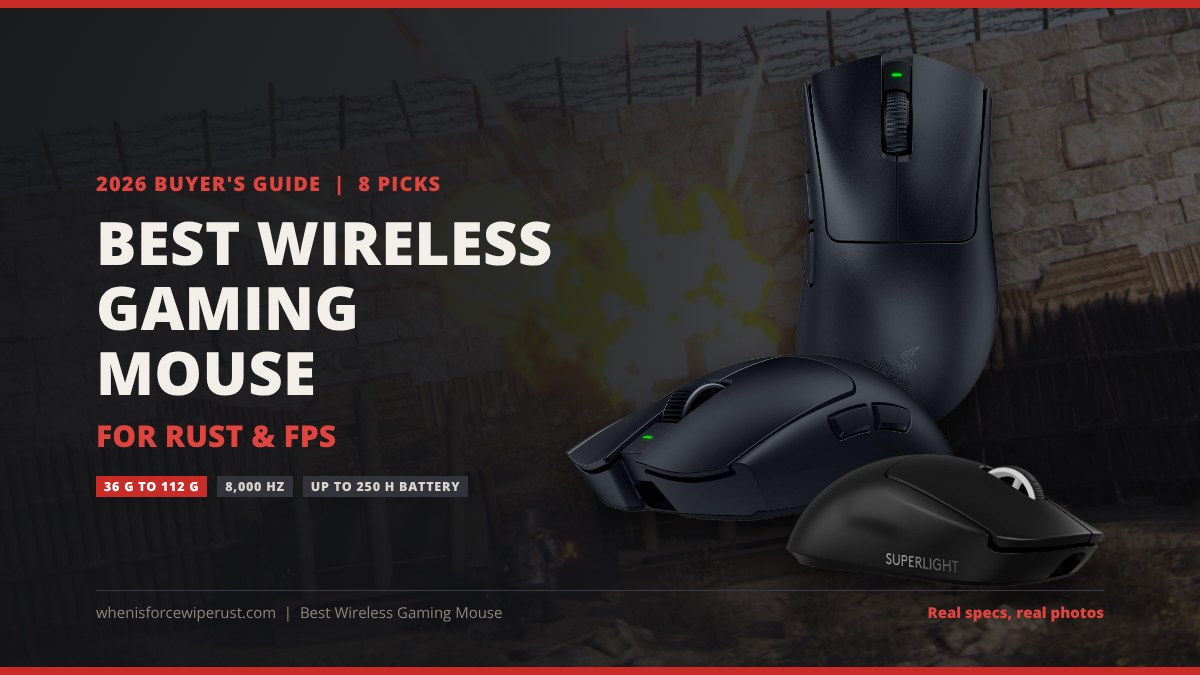
Best Wireless Gaming Mice Compared
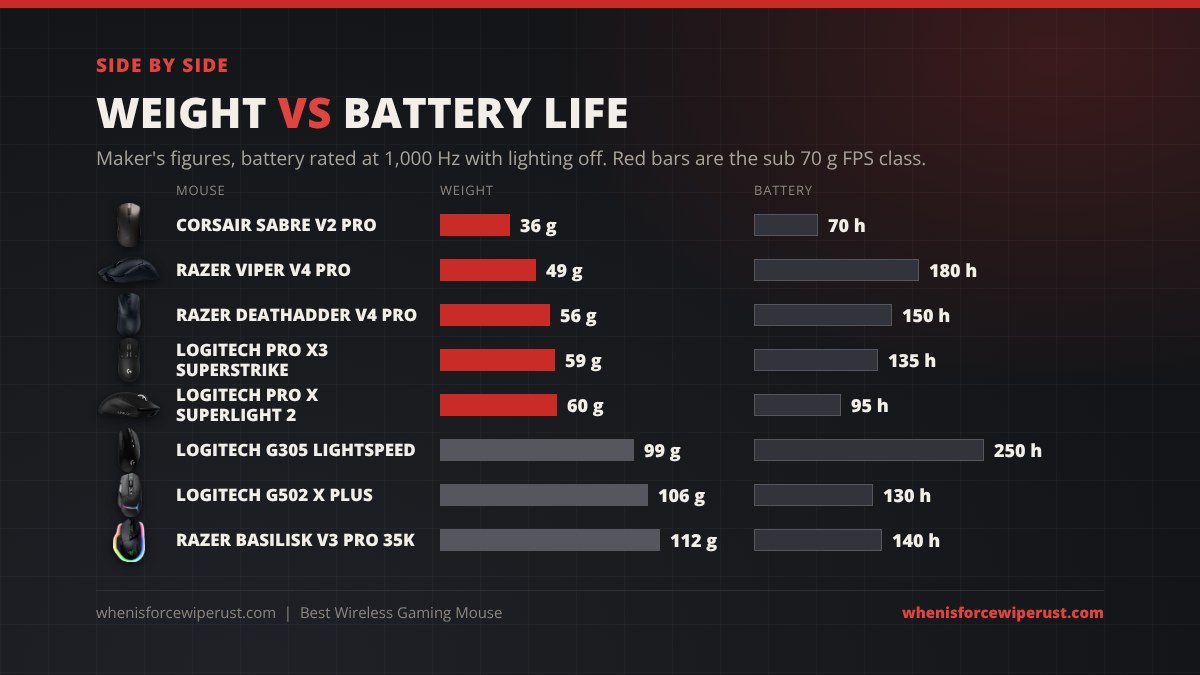
The table puts every pick side by side. Weight is the maker’s figure for the black model, battery life is the rated figure at 1,000 Hz (running 4,000 or 8,000 Hz cuts it a lot, see the buying guide). Prices move every week on Amazon, so the price column is what we saw at the time of writing and the buttons show today’s price.
| Mouse | Best for | Weight | Sensor | Max polling | Battery | Price seen | Shop |
|---|---|---|---|---|---|---|---|
| Razer Viper V4 Pro | Best overall | 49 g | Focus Pro 50K Gen-3 | 8,000 Hz | 180 h | $160 | Check price |
| Logitech PRO X3 Superstrike | Competitive FPS | 59 g | HERO 2, 48K | 8,000 Hz | 135 h | $200 | Check price |
| Razer DeathAdder V4 Pro | Ergonomic | 56 g | Focus Pro 45K Gen-2 | 8,000 Hz | 150 h | $170 | Check price |
| Logitech PRO X Superlight 2 | All-rounder | 60 g | HERO 2, 44K | 8,000 Hz | 95 h | $146 | Check price |
| Corsair Sabre v2 Pro Wireless | Ultralight | 36 g | Marksman S, 33K | 8,000 Hz | 70 h | $70 | Check price |
| Logitech G305 Lightspeed | Budget | 99 g | HERO, 12K | 1,000 Hz | 250 h (AA) | $30 | Check price |
| Logitech G502 X Plus | Extra buttons | 106 g | HERO 25K | 1,000 Hz | 130 h (37 h RGB) | $150 | Check price |
| Razer Basilisk V3 Pro 35K | Ergonomic + buttons | 112 g | Focus Pro 35K Gen-2 | 1,000 Hz (8K dongle sold separately) | 140 h | $130 | Check price |
The 8 Best Wireless Gaming Mice in 2026
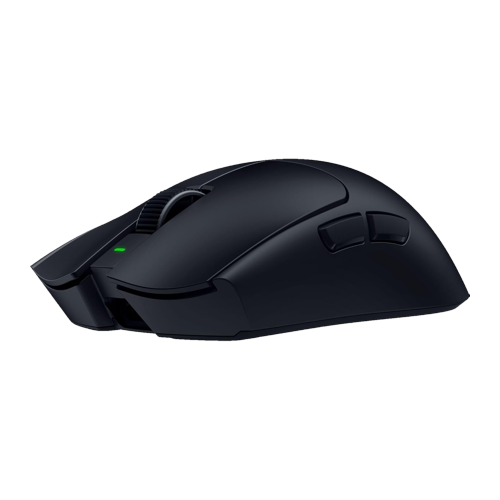
Razer Viper V4 Pro
- Weight49 g (50 g white)
- SensorFocus Pro 50K Optical Gen-3, 50,000 DPI
- Polling8,000 Hz HyperPolling dongle included
- BatteryUp to 180 h at 1,000 Hz, 45 h at 8,000 Hz
- ShapeSymmetrical, right-hand side buttons
The Viper V4 Pro is the mouse to beat in 2026. Razer took the already excellent V3 Pro, cut the weight to 49 g, moved to a new 50K sensor and somehow doubled the battery to 180 hours at 1,000 Hz. The trick is FrameSync, which lines up every sensor frame with the polling cycle, so the sensor stops wasting power on frames the PC never sees. The 8,000 Hz dongle is in the box, and even at 8,000 Hz you get 45 hours, which is a full wipe weekend.
The shape is a medium symmetrical design that suits claw and fingertip grips best, and palm grip if your hands are medium or smaller. Gen-4 optical switches have no debounce delay and never double click. The only real complaints are the price and the clicks, which are loud and a little hollow. There is no RGB, which for a competitive mouse is a feature, not a flaw.
- 49 g with a flagship sensor
- 180 hour battery, 8K dongle included
- Superb build, no flex
- Expensive
- Loud clicks
- Too small for big palm grippers
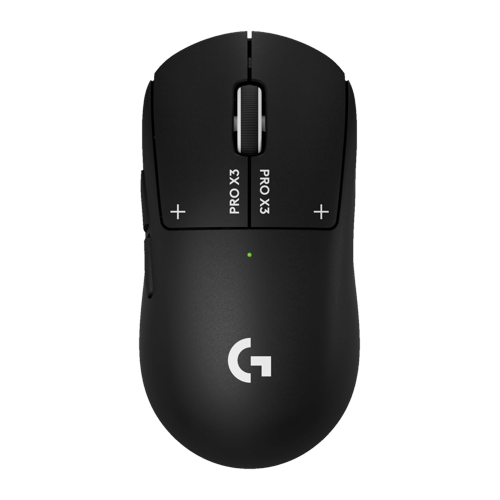
Logitech PRO X3 Superstrike
- Weight59 g
- SensorHERO 2, 48,000 DPI
- Polling8,000 Hz LIGHTSPEED
- BatteryUp to 135 h
- ClicksHITS magnetic analog switches, rapid trigger, adjustable haptic click
The PRO X3 Superstrike is the newest mouse here, released in October 2026, and it is the first time the “rapid trigger” tech from gaming keyboards really works on a mouse. The main buttons are magnetic analog switches, so you set the actuation point yourself, and the click resets the instant you start lifting your finger. A haptic motor gives you the click feel, and you can tune that too. For tap firing a semi-auto rifle or spam clicking a Python, nothing else is this fast.
Compared with the February PRO X2 Superstrike, the X3 fixes the front-heavy balance, bumps the sensor to 48K and adds 45 hours of battery for a total of 135. It is $200, which is a lot for a mouse with no RGB and five buttons. If you want the tech for less, the PRO X2 Superstrike is now around $180 and has the same shape.
- Adjustable actuation and rapid trigger clicks
- 135 hour battery
- Proven Superlight shape
- $200
- Haptic click feel is not for everyone
- Plain plastic body
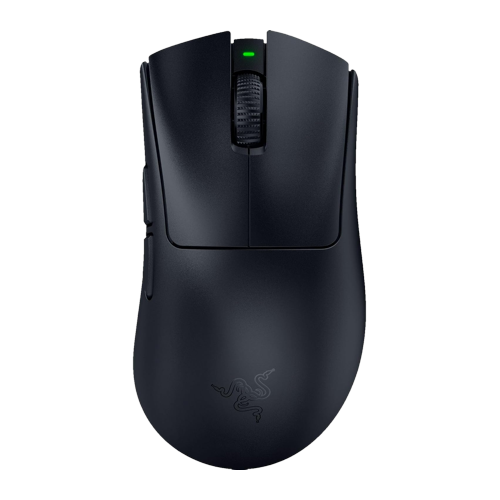
Razer DeathAdder V4 Pro
- Weight56 g (57 g white)
- SensorFocus Pro 45K Optical Gen-2, 45,000 DPI
- Polling8,000 Hz HyperPolling dongle included
- BatteryUp to 150 h at 1,000 Hz, 22 h at 8,000 Hz
- ShapeRight-handed ergonomic, 6 buttons
The DeathAdder shape has been the default ergonomic gaming mouse for almost twenty years, and the V4 Pro is the lightest and best version yet. At 56 g it is 7 g lighter than the V3 Pro while adding an optical scroll wheel, Gen-4 optical switches and a 150 hour battery. The hump sits further back and fills a palm or relaxed claw grip, which is why so many players with large hands end up here after trying a symmetrical mouse and finding it too small.
If you spend hours holding a rifle on a doorway in Rust, a shape that supports the whole hand matters more than 7 g. The downside is the same as the Viper: price, and the 8,000 Hz battery drop to 22 hours, so most people should run it at 1,000 or 2,000 Hz.
- Best ergonomic shape for medium to large hands
- 150 hour battery
- Optical wheel and switches
- Expensive
- Right-handed only
- Battery dives at 8,000 Hz
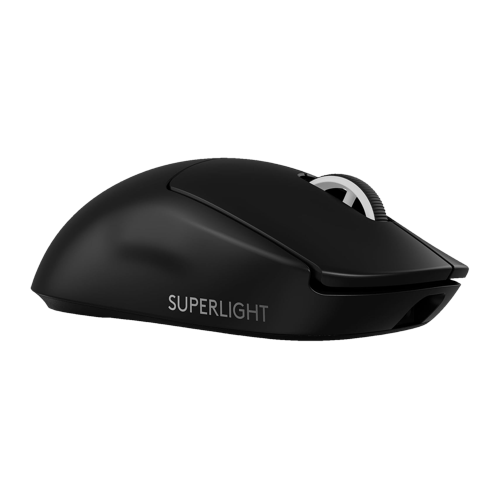
Logitech PRO X Superlight 2
- Weight60 g
- SensorHERO 2, 44,000 DPI
- PollingUp to 8,000 Hz LIGHTSPEED
- BatteryUp to 95 h
- ExtrasLIGHTFORCE hybrid switches, PowerPlay charging, USB-C
The Superlight 2 is the mouse you see in more pro FPS players’ hands than any other, and two years after launch it is the smart buy in Logitech’s range. Same safe medium symmetrical shape as the X3 Superstrike, the same HERO 2 sensor family, 8,000 Hz support and a 95 hour battery, for about $50 less. The LIGHTFORCE switches are optical for speed but have a mechanical feel, so they click like a normal mouse.
It also works with Logitech’s PowerPlay charging mouse pad, which is the one setup where you really never think about battery again. If you do not need adjustable actuation, this is the better value of the two Logitech pro mice, and it is often discounted. The cheaper Superlight 2 SE and the right-handed Superlight 2 DEX use the same internals if you want a different shape or price.
- The reference FPS shape
- 8,000 Hz and PowerPlay support
- Regularly on sale
- 95 hour battery is now mid-pack
- Only 5 buttons
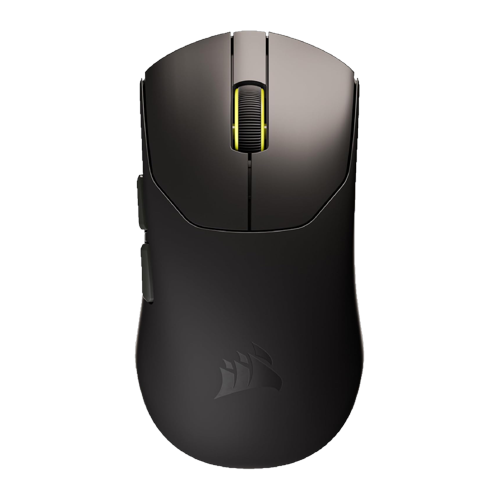
Corsair Sabre v2 Pro Wireless
- Weight36 g
- SensorCorsair Marksman S, 33,000 DPI
- Polling8,000 Hz hyper-polling
- BatteryUp to 70 h at 1,000 Hz, 16 h at 8,000 Hz
- SwitchesMechanical, 5 buttons
Corsair built the Sabre v2 Pro with input from Counter-Strike pros, and it shows: 36 g with no holes, a 33K sensor, 8,000 Hz wireless, and a price around $70 that undercuts the Razer and Logitech flagships by $80 to $130. It is the lightest mouse in this guide by a wide margin and the one to try if you have ever wanted to flick faster than your mouse lets you.
The shape is a smaller symmetrical design that suits claw and fingertip grips, and at this weight a palm grip feels like holding nothing. Battery life is the trade, 70 hours at 1,000 Hz and only 16 at 8,000 Hz, and the switches are mechanical rather than optical. For a pure FPS mouse at this price, those are easy to live with.
- 36 g, no holes
- 8,000 Hz for about $70
- Grippy coating
- 70 hour battery
- Small for large hands
- Mechanical switches
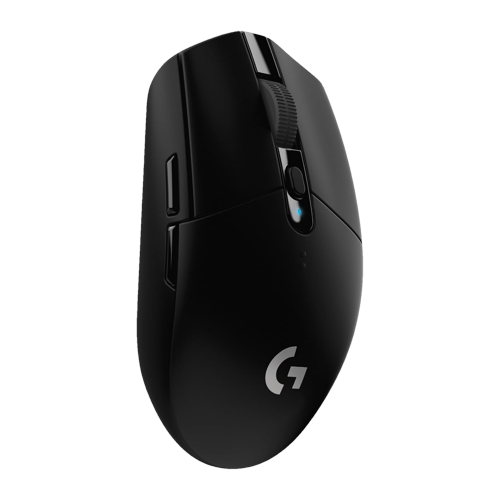
Logitech G305 Lightspeed
- Weight99 g with AA battery
- SensorHERO, 12,000 DPI
- Polling1,000 Hz LIGHTSPEED
- BatteryUp to 250 h on one AA
- Buttons6 programmable, onboard memory
The G305 has been the default “just buy it” budget wireless mouse since 2018, and at around $30 it still is. The HERO sensor is flawless at the DPI ranges people actually use, the LIGHTSPEED wireless is the same tech as Logitech’s pro mice, and a single AA battery lasts around 250 hours. There is nothing to charge and nothing to go wrong. It comes in black, white, blue, mint and lilac.
The weight is the catch. At 99 g with a battery it is twice the weight of the mice above, so if you run a low sensitivity and swipe a lot, you will feel it. A lithium AA drops it to about 90 g. If you want a lighter budget mouse, the MCHOSE G3 V2 copies the G305 shape at 59 g with a rechargeable battery for the same price, but the G305 is the one with a proven track record and Logitech’s support behind it.
- Around $30
- 250 hours on a AA
- Logitech software and reliability
- 99 g
- 1,000 Hz only
- Small for big hands
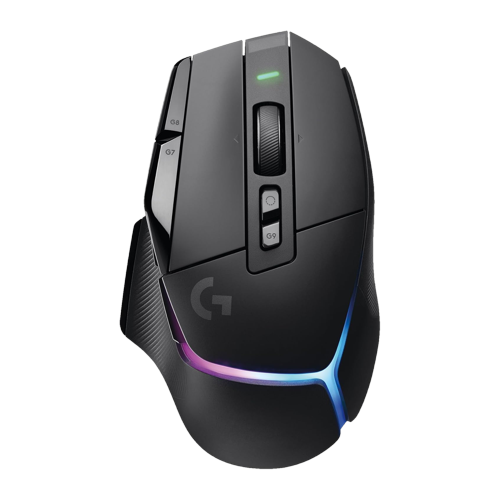
Logitech G502 X Plus
- Weight106 g
- SensorHERO 25K, 25,600 DPI
- Polling1,000 Hz LIGHTSPEED
- BatteryUp to 130 h, 37 h with RGB on
- Buttons13 controls, infinite scroll toggle, PowerPlay
Rust is a game with a lot of keybinds: hotbar slots, voice, map, crouch, sprint, inventory, chat, and a pile of console command binds most players put on their mouse. The G502 X Plus is built for that. It has 13 controls including a DPI shift “sniper” button you can remap, a tilt wheel with an infinite scroll toggle, and LIGHTFORCE hybrid switches on the main buttons.
It is 106 g, so this is not a flick-shot mouse, and the RGB strip drops the battery from 130 hours to 37. Turn the lighting off and it is a comfortable, feature-packed right-handed mouse that works with PowerPlay charging. If you do not care about lighting, the plain G502 X Lightspeed is the same mouse without RGB and usually cheaper.
- 13 remappable controls
- Infinite scroll wheel
- PowerPlay compatible
- 106 g
- RGB kills battery life
- 1,000 Hz only
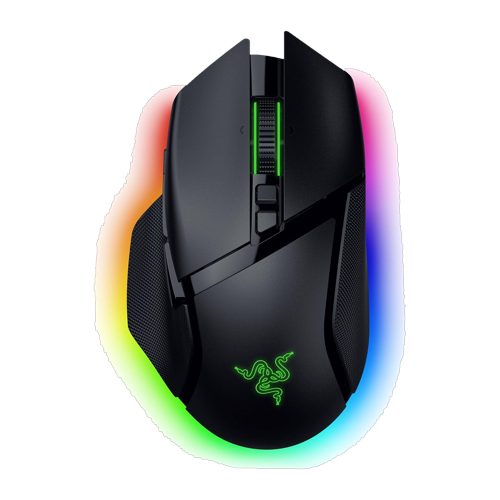
Razer Basilisk V3 Pro 35K
- Weight112 g
- SensorFocus Pro 35K Optical Gen-2, 35,000 DPI
- Polling1,000 Hz, 8,000 Hz with the optional HyperPolling dongle
- BatteryUp to 140 h HyperSpeed, 210 h Bluetooth
- Buttons13 controls, HyperScroll tilt wheel, 11-zone Chroma
The Basilisk V3 Pro 35K is Razer’s answer to the G502: a big, right-handed, thumb-rest shape with 13 controls, a tilt wheel that switches between notched and free spin on its own, and the brightest RGB on any mouse. The 2024 “35K” refresh moved to the Focus Pro 35K Gen-2 sensor and stretched battery life to 140 hours over HyperSpeed, or 210 on Bluetooth.
At 112 g it is the heaviest mouse here, and the 8,000 Hz dongle and charging dock are sold separately. But if you want a comfortable desk mouse that does everything, binds everything and still tracks perfectly, it is the pick, and it is usually $20 cheaper than the G502 X Plus.
- Comfortable thumb-rest shape
- 140 hour battery with RGB
- Smart tilt scroll wheel
- 112 g
- 8K dongle costs extra
- Right-handed only
Why Your Mouse Matters in Rust
Rust is a long-session game with a hard recoil system. The first day after a Rust force wipe can run ten hours, and the fights that decide a wipe come down to who can hold a spray pattern on a moving target at 50 metres. A few things about a mouse matter more here than in most games.
- Recoil control is a tracking task: Rust’s AK and LR-300 patterns are controlled by pulling the mouse in a shape, not by clicking. A light mouse with a high quality sensor makes the pull smooth, and 2,000 Hz or more polling makes small corrections register sooner. See our Rust aim training guide for the drills.
- Battery has to survive wipe day: a mouse that dies at hour eight of a wipe is a problem. Every pick above lasts a full wipe weekend at 1,000 Hz, and the Viper V4 Pro and G305 do it for weeks.
- Buttons replace keyboard reaches: binding voice, crouch, hotbar slots or a combat log or auto-run bind to the mouse keeps your left hand on WASD in a fight. If you use a lot of binds, the G502 X Plus and Basilisk V3 Pro are built for it.
- Low sensitivity needs space: most good Rust players run a low sens and a big pad. A light mouse makes the big swipes less tiring, and a monitor arm frees the desk space for the pad.
How to Choose a Wireless Gaming Mouse
1. Shape and grip first
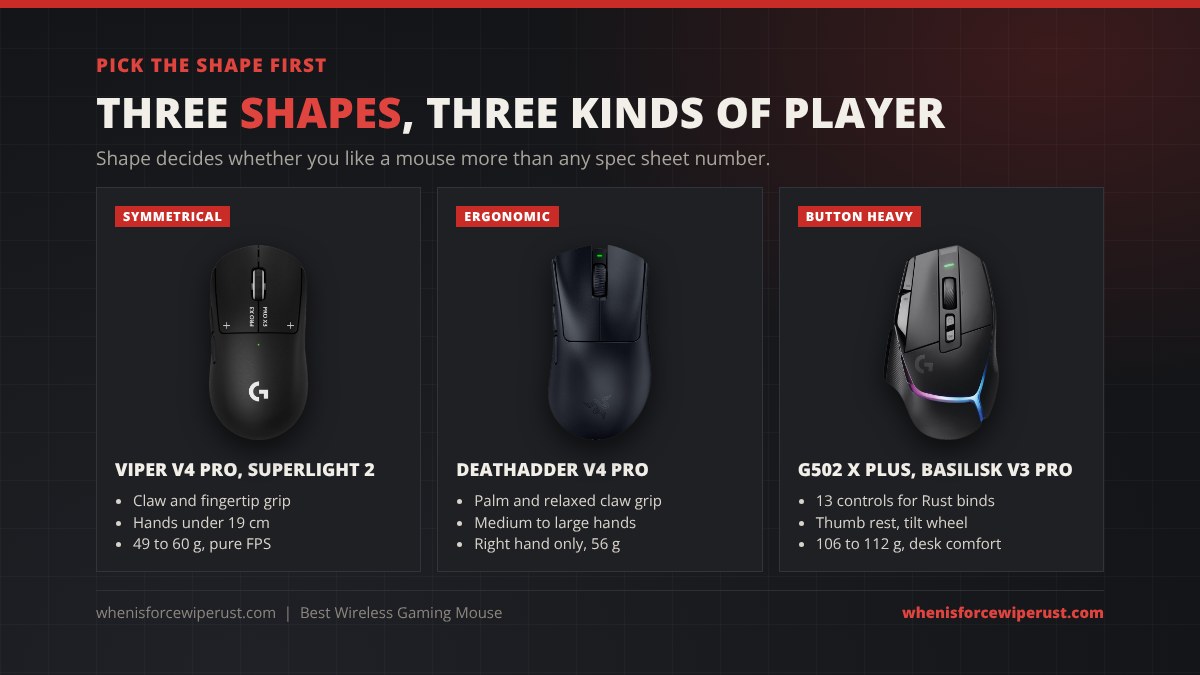
Shape decides whether you like a mouse more than any spec. Measure your hand from wrist crease to the tip of your middle finger. Under 18 cm, a medium symmetrical shape like the Viper or Superlight fits most grips. Over 19 cm, or if you palm grip, an ergonomic shape like the DeathAdder V4 Pro or Basilisk fills the hand better. Claw and fingertip grippers can go smaller and lighter, which is where the Sabre v2 Pro lives.
2. Weight
Under 60 g is the flagship FPS class now. 60 to 80 g is light enough for anyone, and over 100 g you will feel it on big swipes but gain buttons, battery and comfort. Do not chase the lowest number: a 49 g and a 60 g mouse feel almost the same after a day, but a bad shape never stops being bad.
3. Sensor and DPI
Every sensor in this guide tracks perfectly. DPI numbers like 44,000 or 50,000 are marketing; most players run 400 to 1,600 DPI. What matters is the sensor’s max speed and that it has no smoothing or acceleration, and all eight here pass. For Rust, set DPI once and tune in-game sensitivity instead.
4. Polling rate
1,000 Hz reports position every millisecond and is still what most pros use. 4,000 and 8,000 Hz reduce input latency by a fraction of a millisecond and make tracking look smoother on a high refresh monitor, but they cut battery life by two to four times and load the CPU. If you have a 240 Hz or faster monitor, try 2,000 or 4,000 Hz. On a 144 Hz screen you will not see the difference.
5. Battery life
Rated figures are at 1,000 Hz with lighting off. Anything over 70 hours lasts a week of heavy play. Check the 8,000 Hz figure if you plan to use it: the Viper V4 Pro’s 45 hours is excellent, the DeathAdder’s 22 and the Sabre’s 16 mean charging every couple of days. USB-C charging is standard now, and Logitech’s PowerPlay pad or Razer’s dock remove the question entirely.
6. Buttons and software
Five buttons (left, right, wheel, two side) is the FPS standard. If you bind a lot, look at 10 plus controls on the G502 X Plus or Basilisk. Also check the software: Razer Synapse and Logitech G HUB both store profiles on the mouse, so your DPI and binds work on any PC. Razer and Corsair now offer web-based configuration too, which saves installing anything.
Setting Up a Wireless Mouse for Rust
- Plug the dongle into a front USB port or the included extender. Wireless mice want line of sight to the receiver. Behind a metal case on the floor is the worst place for it.
- Set polling in the software. Start at 1,000 Hz. Move to 2,000 or 4,000 Hz only if you have a high refresh monitor and a CPU with headroom.
- Set one DPI and turn off DPI cycling. Remap the DPI button to something useful like push to talk so you never bump your sensitivity in a fight.
- Turn off lighting. On the G502 X Plus it is the difference between 37 and 130 hours.
- Bind the side buttons. Common Rust binds are voice chat, crouch toggle, and the two hotbar slots you reach for in a fight, usually meds and a melee weapon.
- Check Windows settings. Pointer speed on the 6th notch and “Enhance pointer precision” off, otherwise Windows adds acceleration your sensor is working hard to avoid.
Want to make the most of the new mouse? Our Rust aim training guide covers the recoil servers and routines, and the Rust weapon tier list tells you which guns are worth learning first.
Wireless Gaming Mouse FAQ
What is the best wireless gaming mouse in 2026?
The Razer Viper V4 Pro is the best wireless gaming mouse for most players in 2026: 49 g, a 50K sensor, 8,000 Hz polling and 180 hours of battery. The Logitech PRO X3 Superstrike is the pick for competitive players who want rapid trigger clicks, and the Logitech G305 Lightspeed is the best budget option at around $30.
Is a wireless gaming mouse as fast as wired?
Yes. Modern 2.4 GHz gaming wireless from Razer, Logitech and Corsair has the same or lower latency than a wired mouse, and all of the mice in this guide except the G305, G502 X Plus and Basilisk support 8,000 Hz polling over wireless. The old wireless lag problem was solved years ago; Bluetooth is the only mode you should avoid for gaming.
How much should a gaming mouse weigh?
For FPS games, 50 to 70 g is the sweet spot and under 50 g is the ultralight class. Mice with lots of buttons and RGB like the G502 X Plus (106 g) and Basilisk V3 Pro (112 g) are heavier but more comfortable for long sessions. Shape matters more than a few grams either way.
Do I need 8,000 Hz polling?
No. 1,000 Hz is still the standard and what most pros use. 4,000 or 8,000 Hz gives slightly smoother tracking on 240 Hz and faster monitors, but it cuts battery life by two to four times and uses more CPU. If you have a high refresh monitor, try 2,000 Hz as a middle ground.
What is the best wireless gaming mouse for Rust?
For Rust’s recoil-heavy gunplay, a light mouse with a flawless sensor matters most, so the Razer Viper V4 Pro, Logitech PRO X Superlight 2 or Corsair Sabre v2 Pro are the best choices. If you bind a lot of commands to the mouse, the Logitech G502 X Plus or Razer Basilisk V3 Pro 35K give you 13 controls.
What DPI should I use?
Most players use 400 to 1,600 DPI. A good start is 800 DPI, then set your in-game sensitivity so one full swipe of your mouse pad turns you roughly 360 degrees. The 44,000 or 50,000 DPI maximums on new sensors are marketing numbers and have no effect at normal settings.
How long do wireless gaming mouse batteries last?
At 1,000 Hz, current flagships last 95 to 180 hours of use per charge, and the AA powered Logitech G305 lasts about 250 hours. Running 8,000 Hz drops that to 16 to 45 hours depending on the mouse, and RGB lighting can cut it by two thirds, so turn lighting off if battery matters to you.
Do you earn money from these links?
Some links on this page are affiliate links, so we may earn a small commission if you buy through them at no extra cost to you. The picks and their order are based on the specs and use case, not on commission.
Specs are from Razer, Logitech and Corsair’s official product pages and Amazon listings as of October 2026. Prices change often, so check the current price before you buy.