
Rust skin trading sites let you swap the skins you own for other skins, or turn them into cash, without waiting for a friend who wants the same trade. Some run automated trade bots, some are player marketplaces, and a few do both. Underneath all of them is the same thing: a normal Steam trade offer that you accept.
This guide ranks the best places to trade Rust skins using live data. On October 23, 2026 we checked 5,410 Rust skins across 16 markets, so you can see which sites actually hold Rust stock and how much more or less they ask than Steam. You will also find how a bot trade works step by step, the Steam trade holds that apply to Rust, the scams that empty inventories, and how to lose less value on every swap. If you only want to buy, our where to buy Rust skins guide compares prices for buyers.
- Best Sites
- Bots vs Markets
- How It Works
- Price Check
- Steam Trades
- Trade Holds
- Which to Use
- Scams
- Tips
- FAQ

Best Rust Skin Trading Sites
Every Rust skin is a Steam item, so every trading site works with the same inventory. What changes is whether you trade with a bot or another player, how much Rust stock the site has, and how big the gap is between what it pays for your skins and what it charges for its own.

| Site | Type | Rust skins in stock | Rust listings | Median ask vs Steam |
|---|---|---|---|---|
| Steam trade offers | Player to player | Any tradable skin | – | You set the deal |
| SkinSwap | Trade bots | 2,474 | 55,196 | 3% less |
| CS.Deals | Bots + marketplace | 5,181 | 83,590 | 23% less |
| Tradeit.gg | Trade bots | 1,540 | 14,971 | 70% more |
| DMarket | Marketplace + trades | 5,109 | 42,847 | 23% less |
| Skinport | Marketplace (cash) | 5,348 | 110,091 | 26% less |
| Waxpeer | Peer to peer | 4,519 | 40,084 | 23% less |
| CS.Trade | Trade bots | 2,229 | 3,805 | 9% more |
| Swap.gg | Trade bots | 2,392 | 16,223 | 18% more |
| Loot.farm | Trade bots | 298 | 1,063 | 19% more |
We counted a site as stocking a skin when it had at least one listed. “Median ask vs Steam” compares each site’s lowest asking price with the lowest Steam listing for the same skin. Steam itself had 204,844 Rust listings, more than any other market. For trade bot sites, the asking price is what the bot charges for its skins; what it pays for yours is lower, which is how bot sites make money.
Trade Bots vs Marketplaces
Rust trading sites come in three kinds, and they suit different jobs:
- Trade bot sites (SkinSwap, Tradeit.gg, CS.Trade, Swap.gg, Loot.farm). You put your skins on one side, pick skins from the site’s bots on the other, and the trade happens in seconds. Any difference in value is paid with site balance. Fast, but the bot’s prices include the site’s margin.
- Marketplaces (Skinport, DMarket, CS.Deals, Waxpeer). Players list skins at their own price and buyers pay cash or site balance. Selling here and buying the skin you want is usually cheaper than a bot swap, but it takes longer because you wait for a buyer.
- Direct Steam trades. You and another player agree a deal and send a trade offer in Steam. No fees and no site in the middle, but you need someone who wants your skin and has the one you want.
Selling on the Steam Community Market isn’t trading: Steam takes 15% of every sale (5% for Steam and 10% for Rust) and the money stays in your Steam Wallet. Marketplaces charge sellers less, Skinport for example takes 8%, and let you cash out.
How a Trade Bot Site Works

- Sign in through Steam. Click the site’s Steam login and check that the page address is steamcommunity.com. The site only sees your public profile and inventory, never your password.
- Paste your trade URL. Find it in Steam under Inventory, Trade Offers, “Who can send me trade offers?”. Your Steam inventory also has to be set to public so the site can see your Rust skins.
- Pick both sides. Your inventory shows on one side with the price the bot will pay; the bot’s skins show on the other with the price it charges. Top up with balance if your side is worth less.
- Check and confirm. The site sends a trade offer. Compare the bot’s name, Steam level and join date with the bot shown on the site, check every item, then confirm in the Steam Mobile app.
Trade Bot Prices vs Steam: Real Numbers
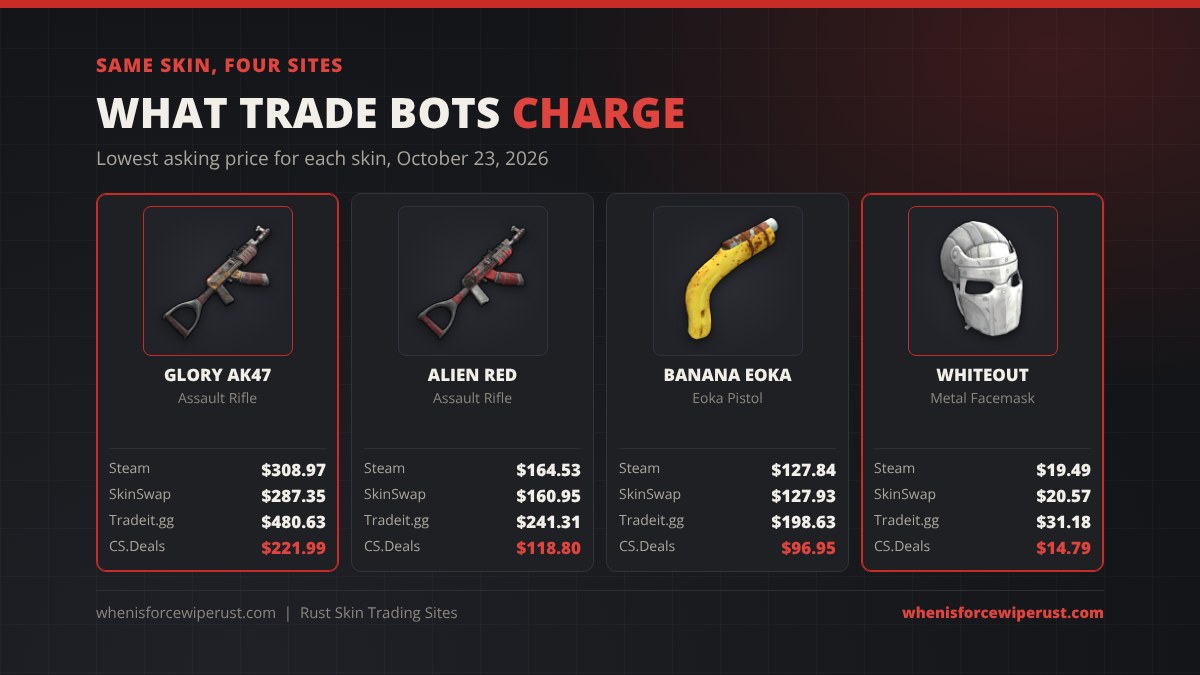
Here is what four popular Rust skins cost on each kind of site, using the lowest asking price on October 23, 2026.
| Skin | Item | Steam | SkinSwap | Tradeit.gg | CS.Deals | DMarket |
|---|---|---|---|---|---|---|
| Glory AK47 | Assault Rifle | $308.97 | $287.35 | $480.63 | $221.99 | $227.53 |
| Alien Red | Assault Rifle | $164.53 | $160.95 | $241.31 | $118.80 | $124.29 |
| Banana Eoka | Eoka Pistol | $127.84 | $127.93 | $198.63 | $96.95 | $97.49 |
| Whiteout Facemask | Metal Facemask | $19.49 | $20.57 | $31.18 | $14.79 | $15.50 |
| Tempered AK47 | Assault Rifle | $10.35 | – | $17.93 | $8.34 | $8.14 |
| Big Grin | Metal Facemask | $1,126.21 | $1,085.35 | – | $799.99 | $834.99 |
The pattern holds across almost every Rust skin: marketplaces are cheapest, SkinSwap sits close to Steam, and Tradeit.gg asks the most. Bot sites with high asks usually also pay more for your skins, so compare the full trade, not one price. For history on any skin, SCMM tracks Rust prices across markets, and our Rust inventory value guide shows what your whole inventory is worth before you trade it.
Trading Rust Skins on Steam
The cheapest way to trade is a direct Steam trade offer. Open a friend’s profile, choose Trade Offer, add your skins and theirs, and send it. To trade with someone who isn’t your friend, they need your trade URL. Steam charges nothing for trades, and both players see every item before they accept.
For bigger trades with strangers, agree the deal in public, check the other account’s profile, level and history, and never use a “middleman” from Discord. Steam has no escrow for player trades, so whoever sends first is trusting the other side.
Steam Trade Holds and Rules for Rust
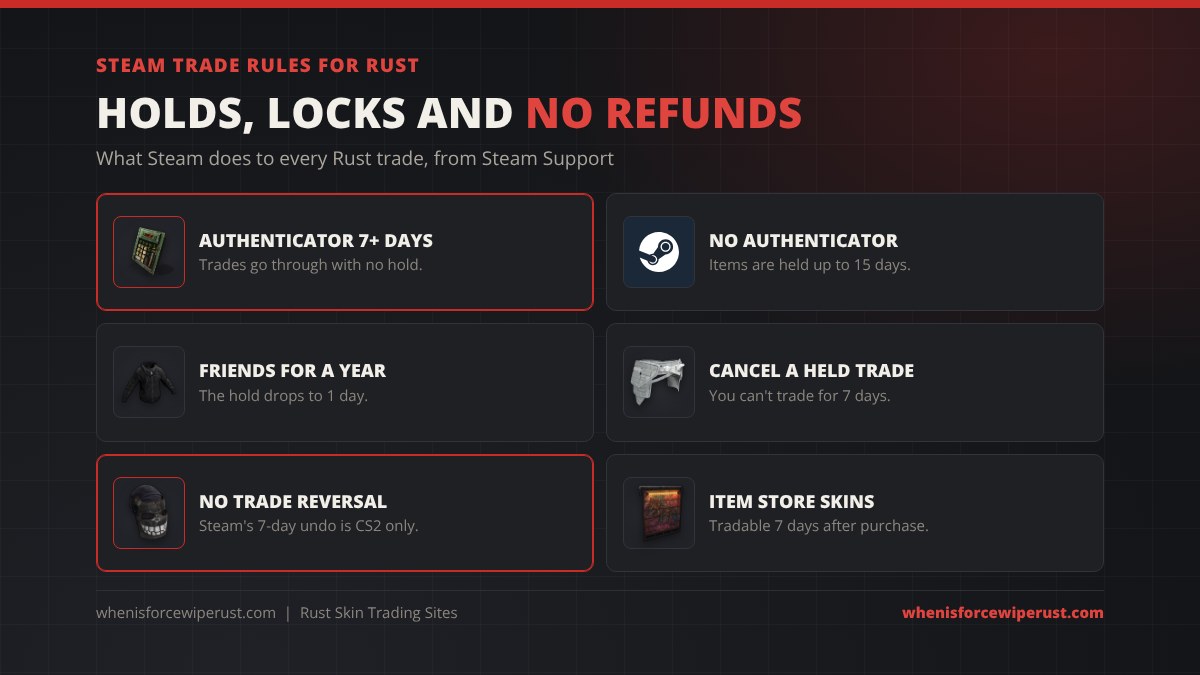
- Use the Steam Mobile Authenticator. Trades made more than 7 days after you turn it on aren’t held by Steam. Turning it on doesn’t shorten holds that already started.
- Without it, items are held up to 15 days before they arrive. Most bot sites won’t trade with an account that has a hold.
- Friends for over a year get a 1 day hold instead.
- Cancelling a held trade blocks you from trading for 7 days.
- Rust trades are final. Steam’s Trade Protection, added in July 2025, locks received items for 7 days and lets the sender undo the trade, but it only covers CS2. Rust skins arrive tradable and a confirmed Rust trade can’t be reversed.
- New Item Store skins can be traded 7 days after you buy them. Permanent store items and most newer Twitch and Kick Drops can’t be traded at all. See the Rust Item Store guide.
On Rust Console Edition there is no trading: console skins are bought with Rust Coins, stay on your account and can’t be traded or sold.
Which Trading Site Should You Use?
| You want | Use | Why |
|---|---|---|
| Swap with a friend or clanmate | Steam trade offer | Free and instant |
| Swap one skin for another now | SkinSwap | Most Rust bot stock, asks near Steam |
| Trade up to a pricier skin | CS.Deals or DMarket | Trades plus marketplace prices about 23% under Steam |
| Cash out Rust skins | Skinport, Waxpeer or DMarket | Most stock, lower seller fees than Steam |
| Rare skin over $1,800 | Third-party marketplace | Steam can’t list it |
| Steam Wallet money | Steam Community Market | Wallet funds can’t leave Steam |
Skin trading sites aren’t gambling sites. Case, coinflip and jackpot sites are betting and are 18+; see our Rust gambling sites guide for how those work and the risks.
Rust Skin Trading Scams to Avoid

- The API key scam. A scammer with your Steam Web API key can cancel a real trade offer and send a copy from a fake bot with the same name and picture. If you see a key you didn’t make on Steam’s API key page, revoke it and change your password.
- Fake Steam logins. Phishing sites copy trading sites and open a pop-up that looks like Steam, even with a fake address bar. If you can’t drag the window outside the browser, it isn’t real.
- Fake bot copies. Check the bot’s name, Steam level and join date against the site before you confirm. A brand-new account named like a bot is a fake.
- Middlemen. Anyone offering to “hold” skins during a trade is the scam. Use a direct Steam trade or a site.
- Huge overpays. A stranger offering far too much for your skin wants you on a fake site or to send first.
- “I accidentally reported you.” Steam staff never message you to verify items by trading them to someone.
Tips for Trading Rust Skins
- Compare buy and sell prices. A bot that pays well for your skins usually charges more for its own. Look at the whole trade.
- Sell, then buy, for big swaps. Selling on a marketplace and buying the skin you want often beats a bot swap by 10% or more, at the cost of time.
- Watch thin stock. A skin with one or two listings can be priced far above its real value on any site.
- Turn on the authenticator first. Seven days later, trades go through with no hold.
- Trade skins you’ll see every wipe. Doors, boxes, guns and armor show up on every server. Pick a fresh server on our Rust force wipe countdown and use them from day one. New to skins? Start with our Rust skins guide.
Rust Skin Trading Sites FAQ
What is the best Rust skin trading site?
For instant bot swaps, SkinSwap had the most Rust bot stock on October 23, 2026, with 55,196 listings at about Steam price. CS.Deals and DMarket combine trading with a marketplace that lists Rust skins about 23% under Steam. For swaps with friends, a free Steam trade offer is best.
How do you trade Rust skins?
Send a Steam trade offer to a friend, or use a trading site: sign in through Steam, paste your trade URL, pick your skins and the bot’s skins, then check the bot and confirm the trade in the Steam Mobile app.
Are Rust skin trading sites safe?
Big sites with long track records are generally reliable, but they aren’t run by Valve or Facepunch and Steam can’t reverse a Rust trade. Never share your password or a Steam Web API key, sign in only on steamcommunity.com and check the bot before you confirm.
Can Rust trades be reversed?
No. Steam’s Trade Protection, which lets a trade be undone within 7 days, only covers CS2 items. A confirmed Rust trade is final and Steam Support won’t return the items.
Why is my Rust trade on hold?
Steam holds items for up to 15 days if you haven’t had the Steam Mobile Authenticator on for at least 7 days. Friends for over a year get a 1 day hold. Turning the authenticator on doesn’t shorten a hold that already started.
Why are skins more expensive on trade bot sites?
Bot sites charge more for their skins than they pay for yours, and that spread is how they earn money. On October 23, 2026, Tradeit.gg asked a median 70% above Steam for Rust skins, while SkinSwap asked about 3% under.
Can you trade skins on Rust Console Edition?
No. Console skins are bought with Rust Coins, stay on your Xbox or PlayStation account and can’t be traded or sold.
Can I trade Rust skins for CS2 skins?
Yes, on trade bot sites that stock both games you can put Rust skins on your side and pick CS2 skins from the bot. CS2 items you receive are trade protected for 7 days, so they can’t be traded on right away.
Sources and Further Reading
- Trade holds and the Mobile Authenticator: Steam Support, Trade Holds
- Market rules and limits: Steam Support, Trade and Market Holds
- Rust listings: Steam Community Market, Rust
- Prices and stock across 16 markets (lowest listing per skin, October 23, 2026): SCMM via the rust-skin-archives price feed
- Buying skins: whenisforcewiperust.com, Where to Buy Rust Skins