
Rust server tags are short labels like Weekly, Vanilla, EU and PvE that every server sends to the server browser, so players can filter for the kind of server they want. Server owners set them with one convar, server.tags, using a comma separated list such as server.tags weekly,vanilla,eu. There are 22 tags you can set yourself, split into three groups where you pick one (wipe schedule, difficulty and region) and nine mode tags you can add freely. A few more, like Modded, Premium and team size, are added for you by the game or your mod framework.
Below you’ll find every tag with its exact value, how many servers use each one right now, a tag builder that writes the server.tags line for you, how players filter by tag in the game, and the mistakes that stop a server showing up in searches.
server.tags weekly,vanilla,eu in server.cfg, one tag per group, no spaces. Use server.pve true for PvE and let Oxide or Carbon add Modded.
- Full Tag List
- Tag Groups
- Automatic Tags
- Most Used Tags
- Filtering as a Player
- Setting Tags
- Tag Builder
- Mistakes
- FAQ
Every Rust Server Tag (Full List)
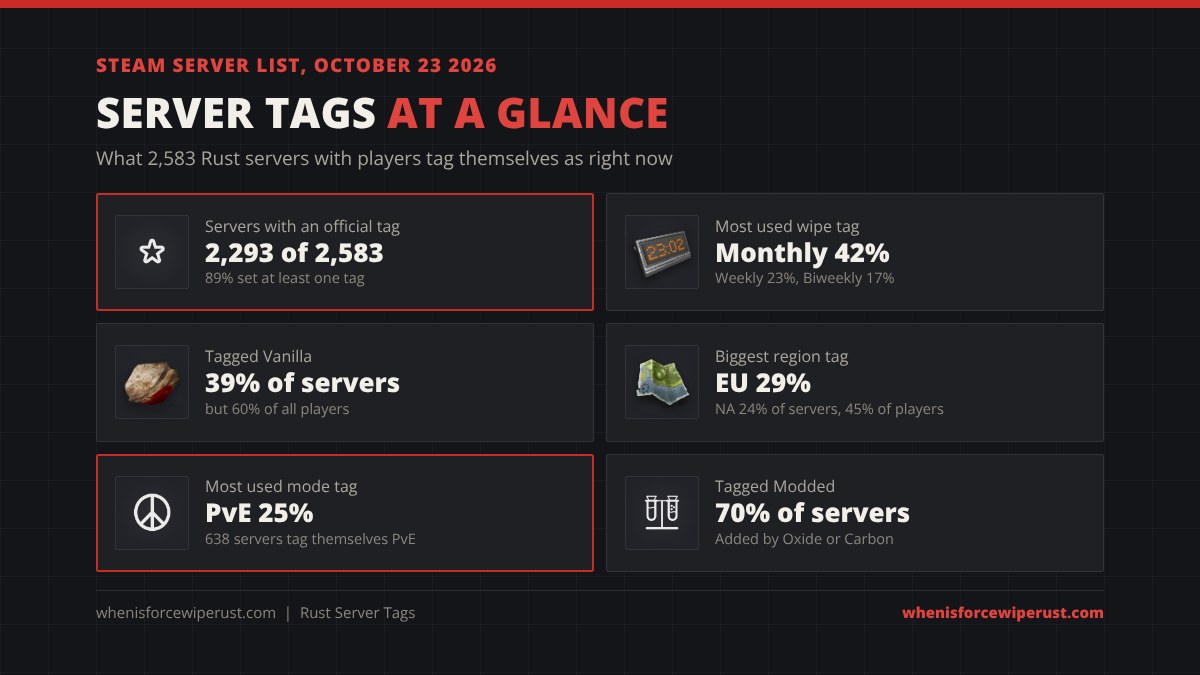
This is Facepunch’s official tag list. The value is what you type into server.tags. The servers now column counts servers with players carrying that tag on the Steam server list; it updates live when the page loads (the numbers in brackets are our October 23, 2026 snapshot).
| Tag in the browser | Value for server.tags | Group | What it means | Servers now |
|---|---|---|---|---|
| Monthly | monthly | Wipe schedule | Map wipes once a month, on the force wipe | 1,084 |
| Biweekly | biweekly | Wipe schedule | Map wipes every two weeks | 430 |
| Weekly | weekly | Wipe schedule | Map wipes every week, usually Thursday | 589 |
| Vanilla | vanilla | Difficulty | Normal Rust rules and rates | 997 |
| Softcore | softcore | Difficulty | Softcore mode: keep half your loot, raid windows, 2x gather | 52 |
| Hardcore | hardcore | Difficulty | Hardcore mode: fog of war map, loot-only guns, 5x ammo cost | 24 |
| North America | NA | Region | Server is in the US, Canada or Mexico | 610 |
| Europe | EU | Region | Server is in Europe or the UK | 746 |
| South America | SA | Region | Server is in South America | 87 |
| East Asia | EA | Region | Server is in East Asia | 219 |
| West Asia | WA | Region | Server is in West Asia | 3 |
| Oceania | OC | Region | Server is in Australia or New Zealand | 81 |
| Africa | AF | Region | Server is in Africa | 6 |
| PvE | pve | Mode | Players can’t damage each other | 638 |
| Tutorial | tut | Mode | New players can start on Tutorial Island | 302 |
| Roleplay | roleplay | Mode | Roleplay rules, events and characters | 82 |
| Creative | creative | Mode | Creative mode: free building and spawning | 48 |
| Minigame | minigame | Mode | Arenas, games and custom game modes | 55 |
| Combat Training | training | Mode | Aim training and PvP practice | 62 |
| Battlefield | battlefield | Mode | Fast PvP with kits, little farming | 80 |
| Battle Royale | broyale | Mode | Last player or team standing | 10 |
| Build Server | builds | Mode | Free building to test base designs | 48 |
| Modded | set automatically | Automatic | Server runs mods (Oxide or Carbon); lists under the Modded tab | 1,801 |
| Premium | set automatically | Automatic | Premium server: you need a Rust inventory worth $15+ to join | 87 |
Snapshot: Friday October 23, 2026, 04:16 UTC, 2,583 servers with players on the Steam server list.
Softcore and hardcore here are the official game modes. If you want to understand them properly, our softcore vs hardcore guide covers every rule, and our Rust server types guide explains PvE, 2x, 10x, battlefield and the rest in plain words.
How Tag Groups Work
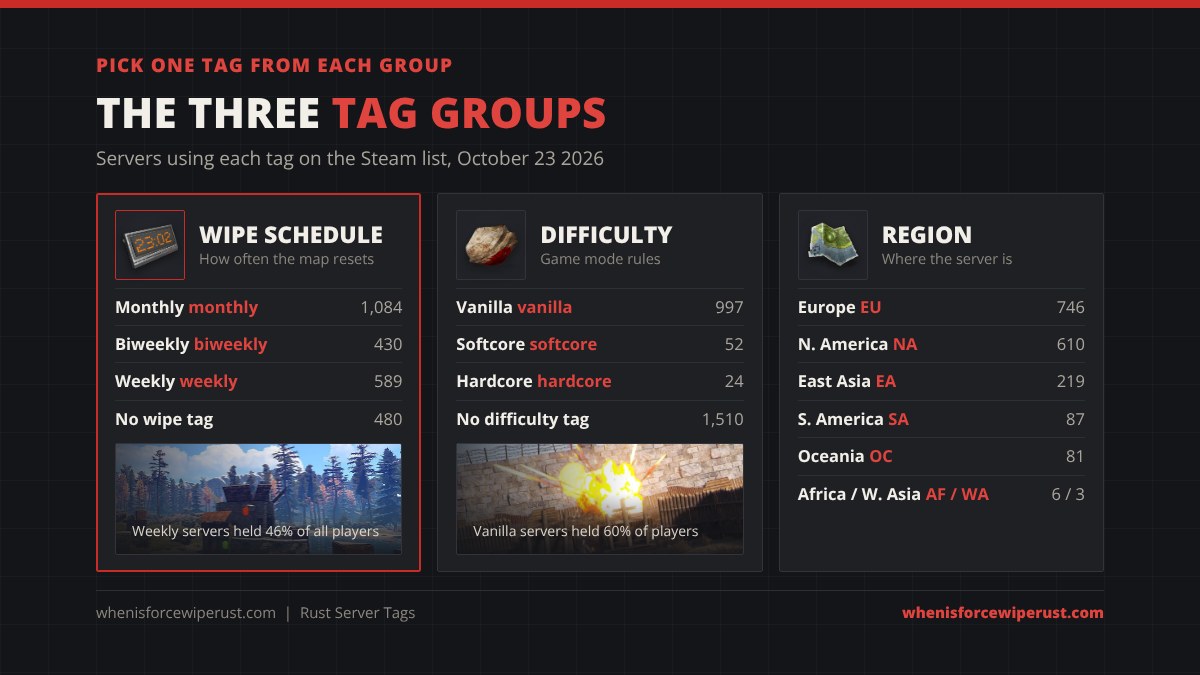
Three groups of tags describe things a server can only be one of: how often it wipes, which difficulty it runs and where it is. Facepunch’s rule is simple: don’t set more than one tag from the same group. If you do, the browser only shows one of them, and the wiki warns that search won’t work properly, so your server can disappear from some filtered searches. On the live list we checked, not a single server carried two wipe tags or two region tags.
- Wipe schedule (monthly, biweekly, weekly). Monthly is the most common at 42% of servers, but weekly servers are the busy ones: 23% of servers held 46% of all players. Every server also wipes on the monthly force wipe; the next one is Thursday, November 5, 2026 at 2 PM ET (7 PM UK), and our Rust force wipe countdown shows it in your time zone.
- Difficulty (vanilla, softcore, hardcore). Vanilla is on 39% of servers and 60% of players. Softcore (52 servers) and hardcore (24) are rare.
- Region (NA, SA, EU, WA, EA, OC, AF). Pick where the server physically is, not where you want players from. EU has the most servers, but NA servers are busier: 24% of servers held 45% of players.
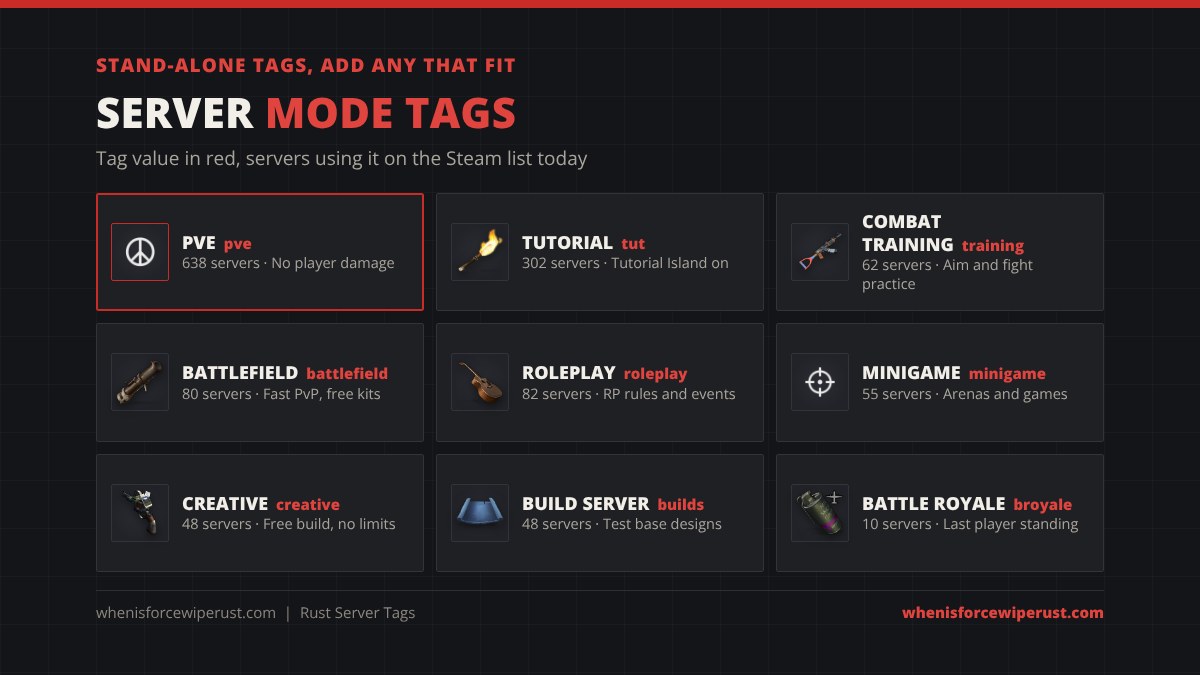
The nine mode tags (pve, tut, roleplay, creative, minigame, training, battlefield, broyale, builds) aren’t in a group. Add every one that is true for your server.
Tags the Game Adds for You
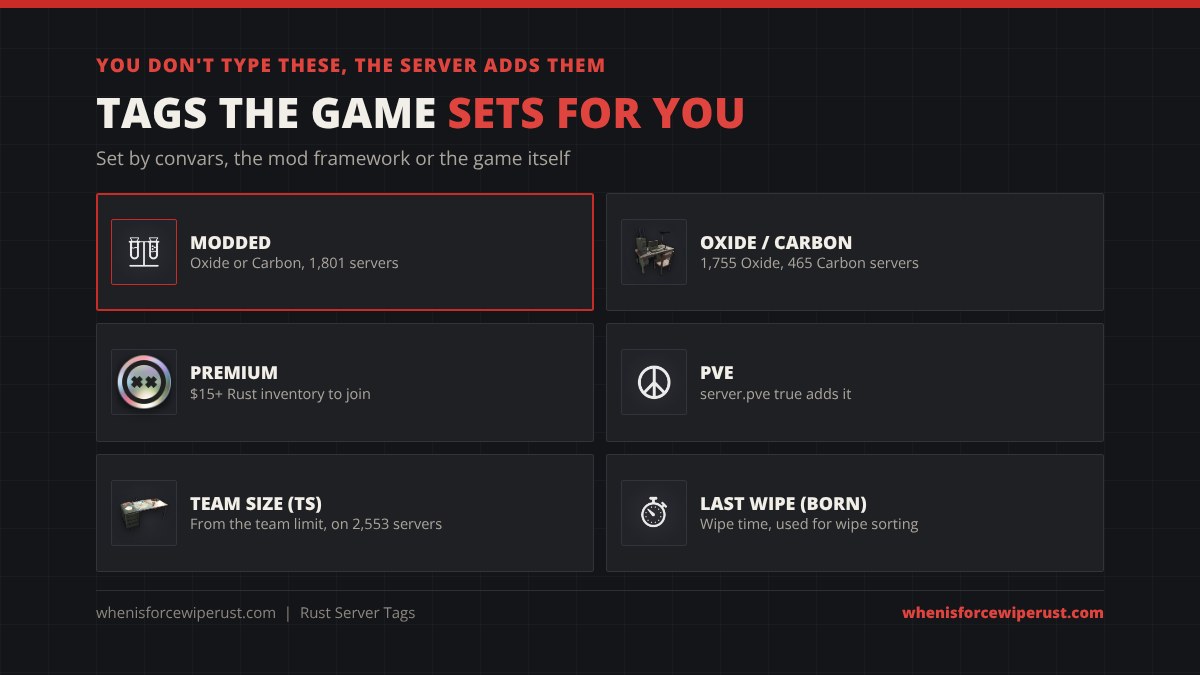
Not every tag comes from the server.tags line. These are set for you:
- Modded. Oxide (uMod) and Carbon tag the server as modded by default, which moves it to the Modded tab. Oxide’s own config has a Modded option that is true out of the box; our Rust server mods guide covers it. 70% of servers on the list carried the Modded tag.
- Oxide and Carbon. The framework also adds its own tag, so the browser knows what the server runs: 1,755 servers ran Oxide and 465 ran Carbon.
- PvE. Setting
server.pve trueturns off player damage and adds the PvE tag by itself. You can still addpveto server.tags for a plugin-based PvE server. - Premium. Premium servers (launched March 2025) only let in players whose Rust Steam inventory is worth $15 or more. The tag comes with that setting, not from server.tags.
- Team size, wipe time and the rest. The server also reports its team limit (from
relationshipmanager.maxteamsize), its last wipe time, max players, queue and game version to Steam behind the scenes. You never type these. The in-game browser shows players and queue; our server browser also uses the team limit and wipe time for its Solo/Duo/Trio filter and its Recently wiped sort.
^w, vanilla ^v, pve ^p, tut ^t, modded ^z, Oxide ^o, Carbon ^y and premium ^q. The team limit is sent as ts plus the number (ts3 for trios). You only see these codes on third-party server lists; in the game and in server.tags you use the normal words.
Plugins and custom maps can add extra words too. The most common one we saw was rustmaps (383 servers running a RustMaps custom map). The in-game filters ignore tags that aren’t on Facepunch’s list.
Which Tags Busy Servers Use
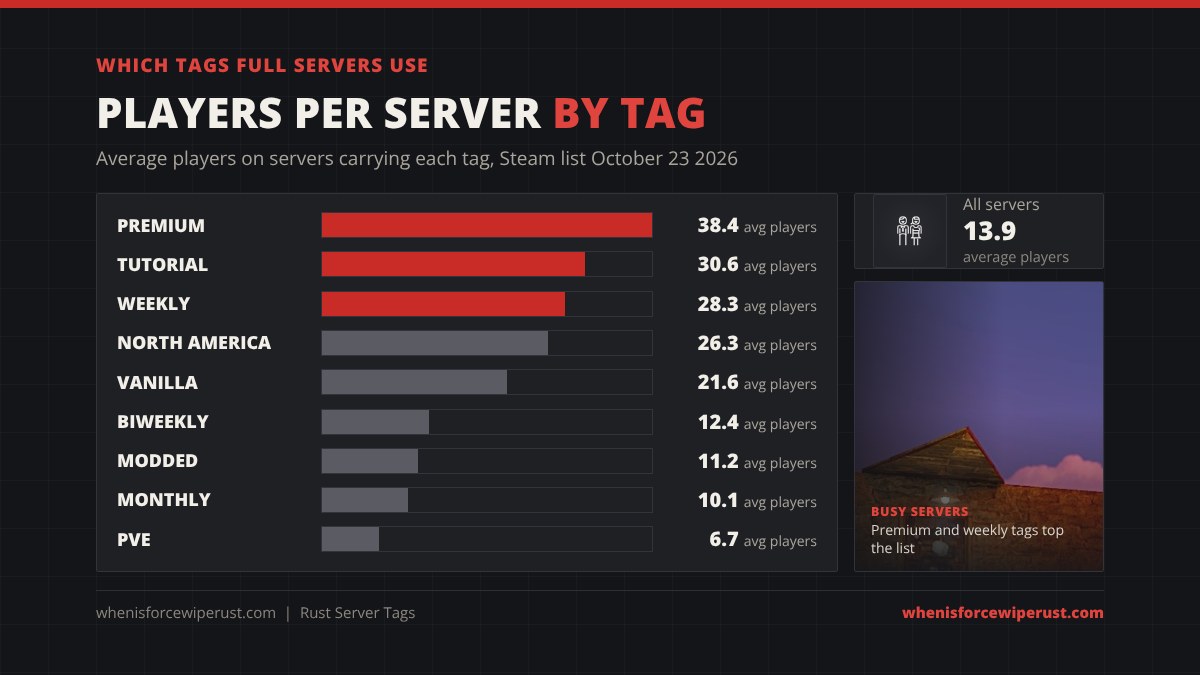
We grouped every server with players on the Steam list by its tags. The average Rust server had 13.9 players. Servers with these tags were far busier:
- Premium: 38.4 players on average. Premium servers are mostly the big networks’ main servers, like Rusty Moose US Main, the busiest server on the list.
- Tutorial: 30.6. 302 servers advertise Tutorial Island, and they include big networks like Rustoria and Rusticated that want new players.
- Weekly: 28.3. Weekly servers wipe every week, mostly on Thursday, so they’re always fresh. Monthly servers averaged just 10.1.
- Vanilla: 21.6. Vanilla servers hold 60% of everyone playing.
- PvE: 6.7. 638 servers tag PvE, but they’re small, so a PvE player has lots of choice and short queues.
Want the busiest fresh servers right now? Our just wiped Rust servers list shows every server that wiped in the last few hours, and the server wipe schedules page has the big networks’ wipe times.
How to Filter Rust Servers by Tag (Players)

- Open the server list from the main menu and pick the Community tab for player-run servers, Official for Facepunch’s servers, or Modded for anything tagged Modded.
- Open the filters and tick the tags you want. A good start for most players is a wipe tag (Weekly if you play a lot, Monthly if you play casually) plus Vanilla.
- Pick your region so your ping stays low. The browser also shows ping per server.
- Check the team limit and rates in the server name and description. Solo, duo, trio and quad limits and 2x or 5x rates are usually written there, because there are no official tags for them.
- Read the description for the exact wipe day and time, blueprint wipes and the Discord.
- Favourite the server so you can find it again on wipe day without searching.
Tags are only as honest as the server owner: 429 servers on the list carried both Vanilla and Modded, usually “Vanilla+” servers that run a few admin plugins. If you want a filter for team size, last wipe, rates or map size, use our live Rust server browser; it reads the same Steam list as the game but filters on more than tags. Playing on PlayStation or Xbox? Console servers work differently, see our Rust Console servers guide.
How to Set Server Tags (Server Owners)
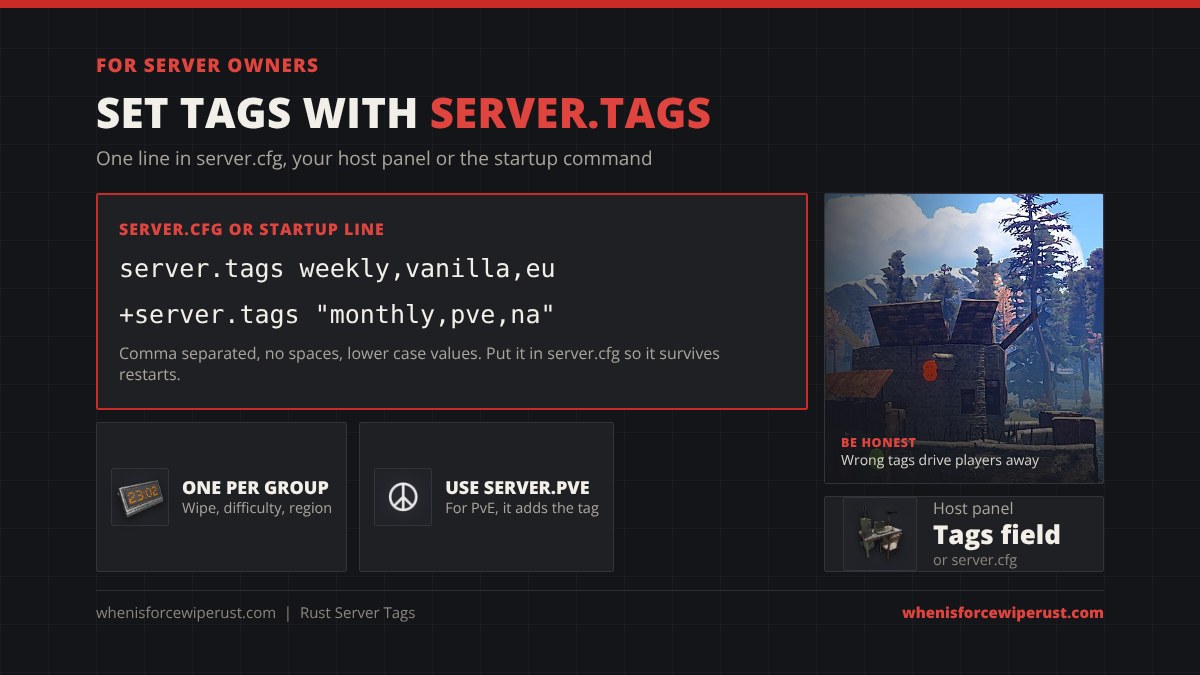
Tags are set with the server.tags convar. Its value is your chosen tag values, separated by commas, with no spaces. You can set it three ways:
- server.cfg (best): add a line like
server.tags weekly,vanilla,eutoserver/<identity>/cfg/server.cfg, so it’s applied every time the server starts. - Startup command: add
+server.tags "monthly,pve,na"to the line that launches RustDedicated. - Host panel: most Rust hosts have a Server Tags field or a startup parameter for it. It writes the same convar.
To change tags later, edit the line and restart the server. A few rules from Facepunch and from what we saw on the live list:
- Use one tag per group: one wipe schedule, one difficulty, one region.
- Add every mode tag that is true for your server, like
pveortut. - Leave modded and premium out; they’re set for you.
- Only a few tags show next to your server in the browser (Facepunch’s wiki says up to four), so pick the ones that matter most.
Setting up a server from scratch? Our Rust server hosting guide compares hosts and covers the full server.cfg.
Rust Server Tag Builder
Click the tags that describe your server and copy the line into your server.cfg. Picking a second tag in the same group replaces the first, so you can’t break the one-per-group rule.
server.tags weekly,vanilla,EUExample line. Click tags above to build your own.
Server Tag Mistakes to Avoid

- Two tags from one group. Weekly plus monthly, or NA plus EU, breaks tag search. Run one wipe schedule per server, or make two servers.
- Vanilla on a heavily modded server. If your plugins change gameplay (kits, rates, teleports), drop the Vanilla tag. Players who filter for Vanilla and find 3x gather leave fast.
- Spaces in the list. Write
weekly,vanilla,eu, notweekly, vanilla, eu. - The wrong wipe tag. If you wipe every Thursday, tag weekly. A monthly tag on a weekly server hides you from the players who want you most.
- No region tag. 831 servers on the list had no region tag at all, so they never show up when players filter by region.
- Tags only in the server name. “Weekly | Vanilla | EU” in the name helps people reading the list, but the filters only use the real tags. Do both.
FAQ
What are Rust server tags?
Rust server tags are labels like Weekly, Vanilla, EU and PvE that a server sends to the server browser. Players use them to filter the server list, and server owners set them with the server.tags convar.
How do I add tags to my Rust server?
Add a line like server.tags weekly,vanilla,eu to your server.cfg, or add +server.tags “weekly,vanilla,eu” to your startup command, then restart the server. Use commas with no spaces and only one tag per group.
What is the full list of Rust server tags?
Wipe schedule: monthly, biweekly, weekly. Difficulty: vanilla, softcore, hardcore. Region: NA, SA, EU, WA, EA, OC, AF. Modes: pve, tut, roleplay, creative, minigame, training, battlefield, broyale, builds. Modded and premium are added automatically.
Can I use more than one wipe or region tag?
No. Facepunch says not to set more than one tag from the same group. The browser only shows one of them and tag search stops working properly, so your server can vanish from filtered searches.
How do I get the PvE tag on my Rust server?
Set server.pve true. It turns off player damage and adds the PvE tag automatically. If you run PvE through a plugin like TruePVE instead, add pve to your server.tags line.
Why is my Rust server listed under Modded?
Oxide and Carbon tag servers as modded by default, which moves them to the Modded tab. If your plugins don’t change gameplay, you can turn the Modded option off in the framework’s config to list under Community.
How many tags show in the Rust server browser?
Only a few tags show next to each server; Facepunch’s wiki says up to four. The rest still work for filtering, so set every tag that is true.
Can I filter Rust servers by team size or wipe date?
Not with the official tags. The team limit and last wipe time are sent to Steam behind the scenes, but the in-game filters don’t use them. Our live Rust server browser does: it filters by Solo, Duo, Trio and Quad and sorts by most recently wiped.
Sources and Further Reading
- Facepunch Rust wiki: Server browser tags (tag values, groups, the one-per-group rule and the display limit)
- Facepunch Rust wiki: Tutorial Island (the tut tag)
- Facepunch Rust wiki: Creating a server
- Tag counts and player numbers: Steam game server list for Rust (app 252490), read on October 23, 2026 at 04:16 UTC through our Rust server browser.
- G-Portal: How to add tags to a Rust server