
Rust decay is the quiet killer that ends more bases than any raider does. Nothing in Rust lasts on its own. Every wall you place, every door you hang and every foundation you pour is slowly ticking down toward destruction from the moment it goes up, and if you do not feed it, the whole thing rots and collapses into a pile of debris. Decay is the game’s built-in cleanup crew, and learning to beat it is the difference between logging in to your base and logging in to an empty patch of dirt.
This is the complete guide to decay and destruction in Rust: how decay actually works, exactly how long each building tier survives with no upkeep, how the Tool Cupboard stops it, what upkeep costs and why it climbs as your base grows, how to demolish your own walls, how the stability system pulls a base down, and how raiders destroy everything you just built. If you only want the headline numbers, they are right below.
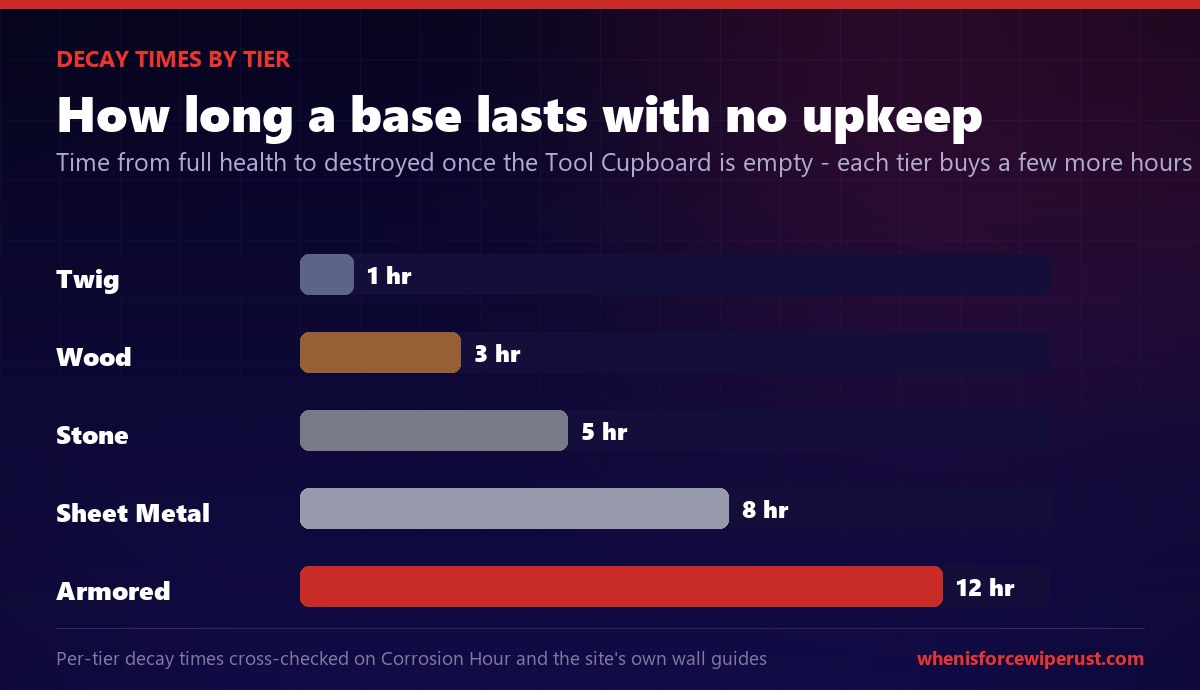
Everything you build in Rust decays over time and will destroy itself if left unmaintained. You stop decay by placing a Tool Cupboard and keeping it stocked with upkeep materials. With no upkeep, twig lasts about 1 hour, wood 3 hours, stone 5 hours, sheet metal 8 hours and armored 12 hours before it is gone. Upkeep costs roughly 10 percent of your build cost per day and climbs toward 33 percent on big bases. You can demolish your own blocks with a Hammer for about 10 minutes after placing them, and everything you build vanishes on the monthly force wipe anyway.
- What decay is
- How decay works
- Decay times by tier
- Stopping decay
- Upkeep cost
- Demolishing your base
- The stability system
- Gibs & debris
- Destroying other bases
- Decay & the wipe
- FAQ
What is decay and destruction in Rust?
Decay is the mechanic that slowly removes player-made structures from the map. Facepunch added it for a simple reason: on a busy server, tens of thousands of walls, foundations and doors pile up fast, and old abandoned bases would choke performance and cover the whole island in junk. Decay is the fix. It steadily drains the health of your building, and once a foundation breaks, the stability system takes over and drops everything that was resting on it. Left alone, a base does not just sit there empty, it destroys itself.
When people say “destruction” in Rust, they usually mean one of four things, and this guide covers all of them. There is decay, the passive rot that eats an unmaintained base. There is demolishing, tearing down your own blocks on purpose with a Hammer. There is raiding, other players blowing your walls apart with explosives. And there is gibs, the physics debris that flies off anything as it is destroyed. Understanding all four is what separates a base that survives the wipe from one that is a pile of rubble by morning.

How decay actually works
Decay does not hit every wall equally or all at once. It works from the ground up. Each building block has its own health pool, and when a structure is not protected by upkeep, decay begins draining that health after a short delay. Foundations and the lowest pieces take the damage first, and because everything above them depends on them for support, the collapse spreads upward once the base falls apart.
Two things decide how fast a piece rots: its building tier and whether it is sheltered. Higher tiers decay slower and start later, so a twig hut is gone in an hour while an armored bunker holds for half a day. Being under a roof used to matter a lot for some deployables, but for the core building tiers the number that matters is the material. The important takeaway is that decay is a countdown, not an instant event, so you always have a window to top up your upkeep before anything is actually lost.

The single most important fact about decay is that it is completely preventable. A structure with a Tool Cupboard that has enough materials in it does not decay at all. Its health sits at full and stays there. Decay only starts once that cupboard runs dry, or if there is no cupboard at all. So the entire game of beating decay comes down to one thing: keep the right materials in your Tool Cupboard.
Rust decay times by tier
This is the table everyone actually wants. These are the times it takes a building tier to decay from full health to destroyed once it has no upkeep, either because the Tool Cupboard is empty or there is no cupboard covering it. The pattern is clean: each tier up roughly buys you a few more hours.
| Building tier | Time to destroy (no upkeep) | Upkeep material | Notes |
|---|---|---|---|
| Twig | ~1 hour | Wood | Barely lasts, never leave a base in twig |
| Wood | ~3 hours | Wood | Also takes full fire damage when raided |
| Stone | ~5 hours | Stone | The standard main-base tier |
| Sheet Metal | ~8 hours | Metal Fragments | Strong midweight walls |
| Armored | ~12 hours | High Quality Metal | Toughest tier, longest decay |
Those hours are the reason you never want to log off with an empty cupboard. If your upkeep runs out while you sleep, a stone base is only holding for five hours before the foundations start breaking. It will not vanish the instant the cupboard empties, but the clock is running the moment it does, and a full workday offline is more than enough to lose a stone base that had no materials banked in it.
Decay time doubles and more as you climb from wood to armored, so upgrading your outer walls is not just about raid resistance. A stone or sheet metal shell gives you a much bigger safety margin if your upkeep ever lapses.
How to stop decay: the Tool Cupboard
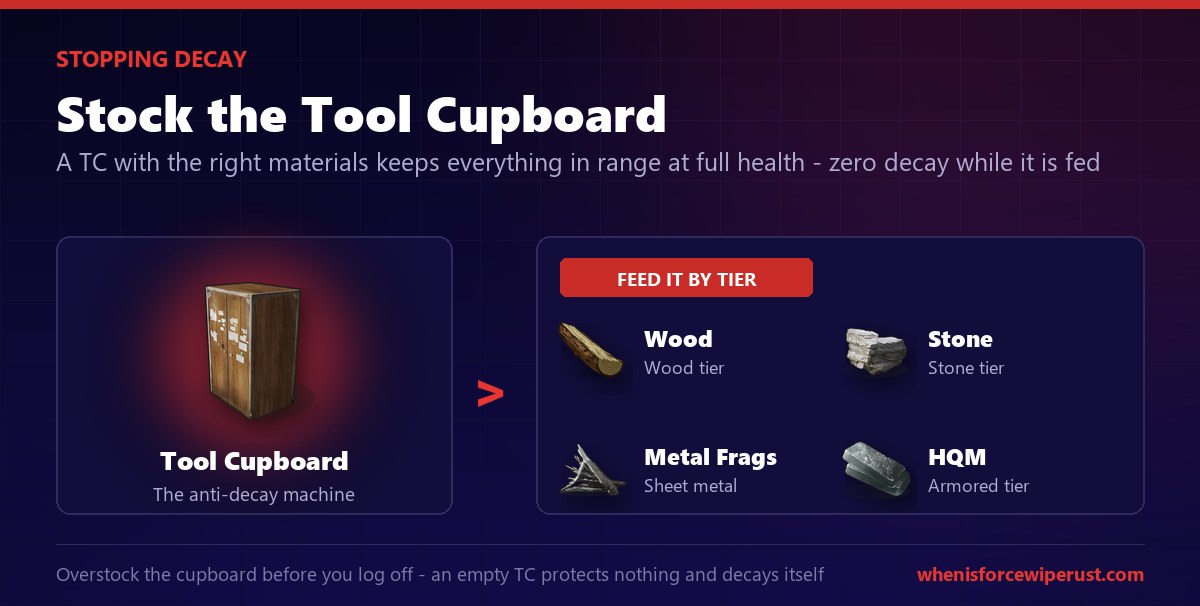
The one and only way to stop decay is the Tool Cupboard, usually called the TC. Placing a TC claims building privilege over everything nearby, and as long as it has the right materials inside it, every structure in its radius sits at full health and never decays. Empty it, and the countdown from the table above begins for everything it was protecting.
Stocking it is simple. Open the Tool Cupboard and drop in the materials your base is made of: wood for wood tier, stone for stone, metal fragments for sheet metal, and high quality metal for armored. The game pulls from those stocks automatically every day to pay your upkeep bill. Most players overstock the cupboard before a long session offline so there is a fat buffer, because an over-full TC is cheap insurance against losing everything.
A few TC rules trip up new players. Only players authorized on the cupboard can pull materials back out, though the base is protected no matter who is authorized. You cannot pick a placed TC back up, so plan its spot. And the cupboard itself will start to decay if you leave it completely empty, so an unstocked TC is not really protecting anything. For the full breakdown of building privilege, the authorization list and TC raiding, read our dedicated Tool Cupboard guide.
What upkeep costs and why it climbs
Upkeep is not a flat fee. The game adds up the total resource cost of every piece in your base, then charges you a percentage of that total every 24 hours, drained from your Tool Cupboard. For a small base that percentage is about 10 percent, so a base that cost 10,000 stone to build burns roughly 1,000 stone a day to maintain. That is very cheap, which is why compact bases are so efficient.
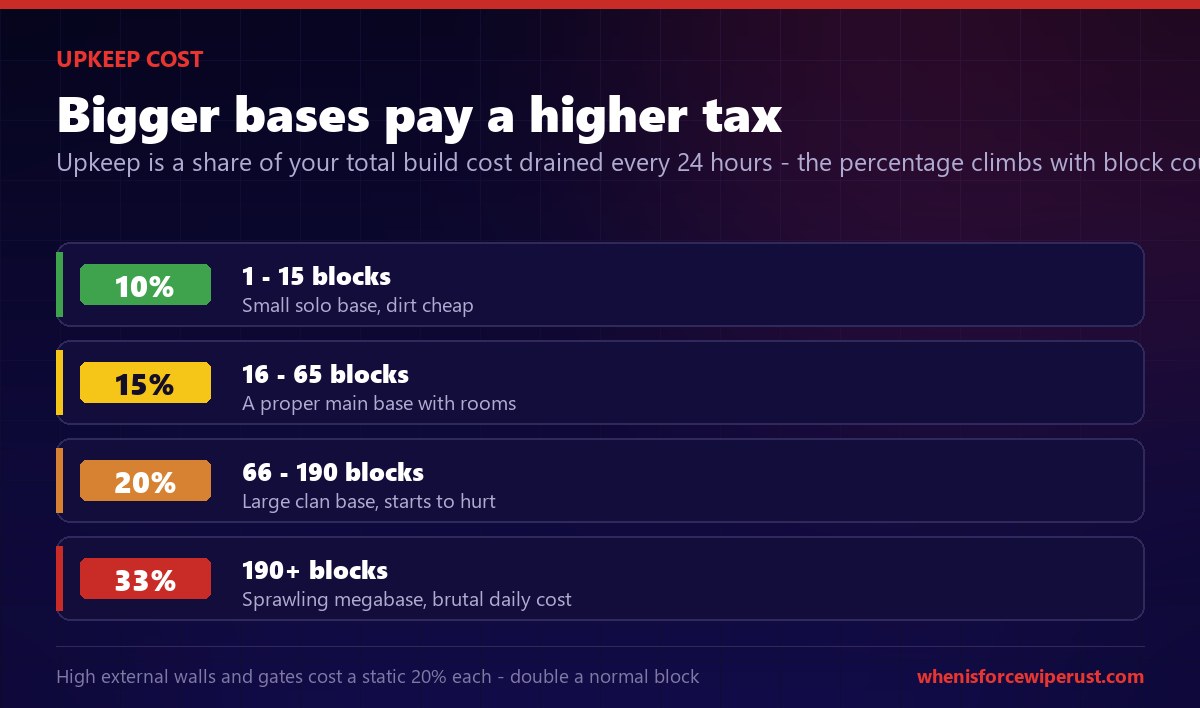
The catch is that the percentage rises as your base gets bigger. Rust uses upkeep brackets based on how many building blocks you have placed, and each bracket taxes you harder. This is a deliberate anti-sprawl mechanic that punishes giant bases and rewards tight, efficient builds. Here is how the brackets scale.
| Building blocks | Daily upkeep | What it means |
|---|---|---|
| 1 to 15 | 10% | Small solo base, dirt cheap to hold |
| 16 to 65 | 15% | A proper main base with rooms |
| 66 to 190 | 20% | Large clan base, upkeep starts to hurt |
| 190 or more | 33% | Sprawling megabase, brutal daily cost |
One special case worth knowing: high external walls and gates carry a static 20 percent upkeep each, double what a normal building block pays, which is why walling off a huge compound gets expensive fast. If your upkeep bill feels crushing, the fix is almost always to build smaller and smarter, not to farm more. Every extra decorative floor and pointless hallway is a tax you pay every single day the base stands.
A megabase you cannot afford to maintain is worse than a compact base you can, because the day your upkeep runs dry, the big base has far more to lose. Match your base size to how much stone and metal you can realistically farm each day.
How to demolish your own base
Sometimes you want to destroy your own building, whether you misplaced a wall, want to reshape your base, or are tearing down to rebuild. Rust gives you a clean way to do it: the Hammer’s demolish option. For a short window after you place a block, you can demolish it instantly and get nothing back, no raiding required.
The window is the key detail. By default you have about 10 minutes after placing or upgrading a block to demolish it, and a similar window to rotate or move it. After that grace period expires, the block is locked in and can only be removed by damaging it like any raider would. Many servers extend or shorten this window, but 10 minutes is the standard, so decide fast if a wall is in the wrong spot.
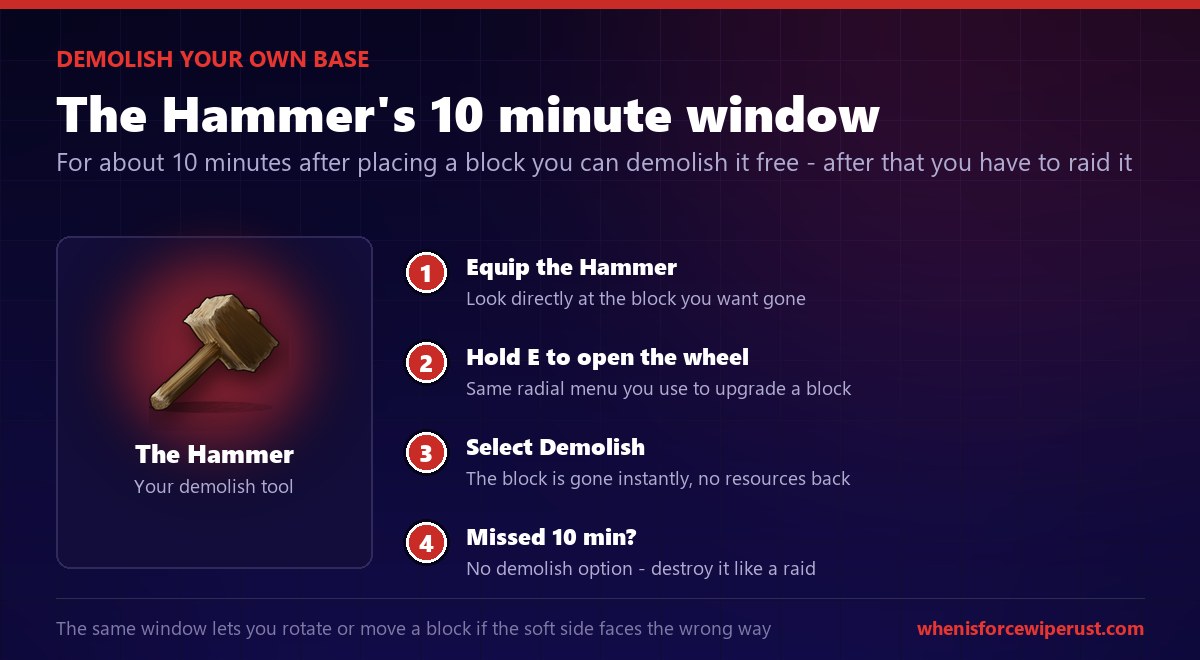
- Equip the Hammer. Hold it out and look directly at the building block you want to remove.
- Hold the interact key. Hold E (the same key you use to upgrade a block’s tier) to open the radial menu on that piece.
- Select Demolish. Choose the demolish option from the wheel and the block is gone instantly. You get no resources back, so demolish is about fixing mistakes, not recovering materials.
- Missed the window? If more than about 10 minutes have passed, there is no demolish option. You will have to destroy the block with explosives or a tool the same way you would raid it.
The same grace window lets you rotate a wall or move a placement if the soft side is facing the wrong way. Fix orientation problems in the first few minutes, because once the window closes a wall’s weak side is stuck facing wherever you left it.
The stability system: why bases collapse
Decay and raiding rarely destroy a base one wall at a time. What really brings a building down is stability, Rust’s structural physics system. Every foundation on the ground has full stability, and every piece you attach above or beside it inherits a little less. Stack too far from a solid support and a piece will not even place. Knock out a support that others depend on, and everything relying on it loses stability and collapses.
This is why raiders and decay both target the bottom of a base. Blow up or rot away a foundation, and the walls, floors and loot rooms it was holding up can come crashing down without anyone touching them directly. It is also why good base designs bury their Tool Cupboard and loot deep behind multiple supported layers, so an attacker cannot simply collapse the whole thing by hitting one weak pillar.
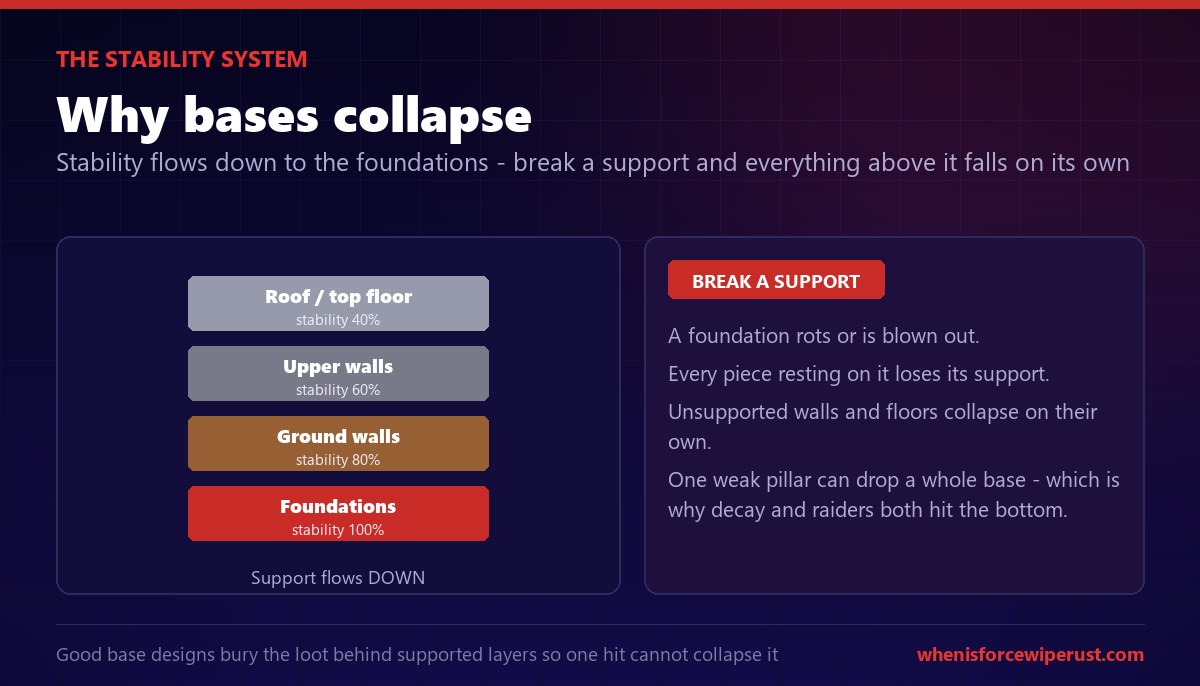
Stability is the hidden reason decay is so destructive. A single foundation rotting out under an unmaintained base can trigger a cascade that takes the whole structure with it, which is how you come back to find not a damaged base but an empty lot. Keep your foundations healthy with upkeep and that cascade never starts.
Gibs: the debris of destruction
Every time something is destroyed in Rust, whether it is a wall blown open by C4, a Bradley APC reduced to a burning wreck, or a helicopter shot out of the sky, the game spawns physics debris called gibs. Gibs are the chunks of rubble and shrapnel that scatter across the ground during destruction. They are pure visual flair, but they matter for performance during heavy fighting and raiding.
You control gibs with the client-side console command effects.maxgibs. It caps how many debris objects can exist at once. Set it lower, or all the way to 0, and the game spawns fewer or no gibs, which can smooth out your frames during a chaotic raid or a big base wipe. This is a personal setting stored on your machine, so a server cannot force it on you, and you can find it through the options menu or type it straight into the console.

If your PC chugs when a base is coming apart, drop effects.maxgibs. Setting it to 0 removes destruction debris entirely, which is a common competitive tweak alongside the other performance settings in our console commands guide.
Destroying other players’ bases
Decay handles abandoned bases, but if you want to destroy a base that is being maintained, you have to raid it, and that means dealing enough damage to break through the walls or doors. Every building tier and every door has a set health pool, and there is a known number of explosives to punch through each one. Picking the cheapest tool for the target is the whole art of raiding, and it is why the raid cost calculator exists.
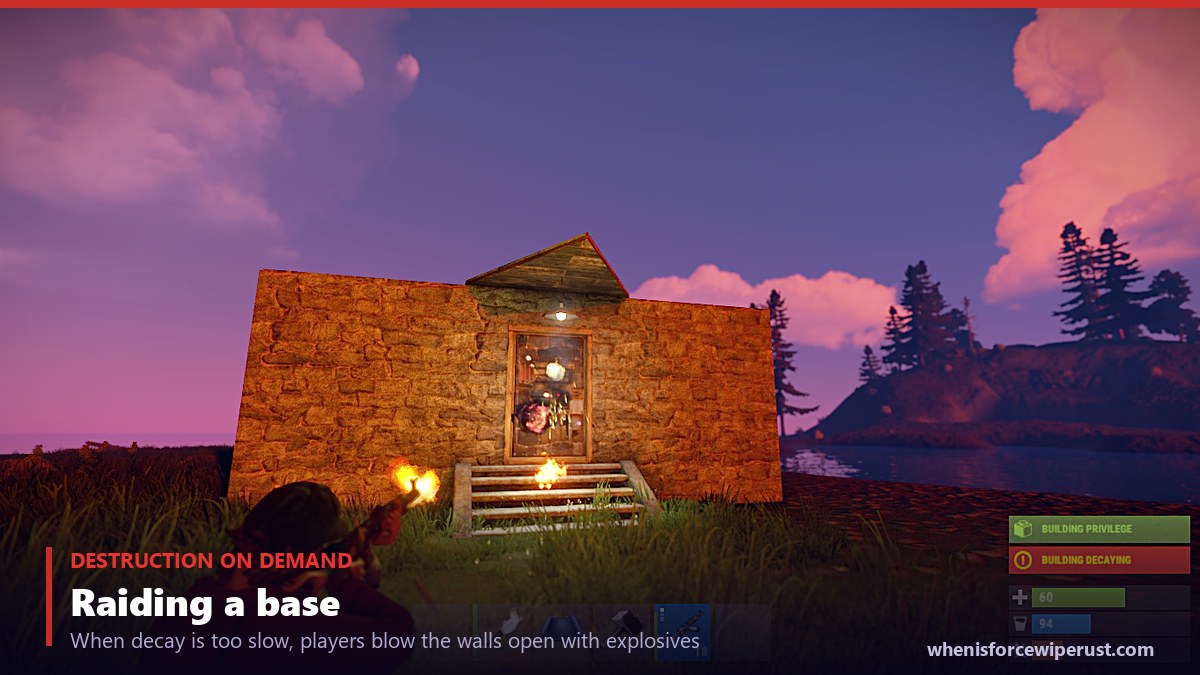
The main tools of destruction, from most to least explosive punch, are the Timed Explosive Charge (C4), the rocket, the satchel charge and explosive 5.56 ammo. Each one has a sulfur cost, and the trick is matching the tool to the target so you spend the least sulfur getting in. The rough rule is C4 for hard walls and explosive ammo or rockets for doors.
| Raid tool | Best against | Why |
|---|---|---|
| C4 | Stone, sheet metal and armored walls | Highest damage per charge, the wall opener |
| Rocket | Walls and doors, fast pushes | Instant travel, no fuse, but sulfur hungry |
| Satchel Charge | Wood and sheet metal doors | Cheap early-wipe eco raiding, can dud |
| Explosive 5.56 | Doors and softer walls | Cheapest sulfur per door, wears your gun |
For the exact explosive counts against every door and wall in the game, plus the sulfur totals, run the numbers through the raid calculator or read the full Rust explosives guide. The defender’s whole job is to make your raid cost more sulfur than the loot inside is worth, and the raider’s job is to prove them wrong.
Decay, despawn and the force wipe
There is one form of destruction that no amount of upkeep can stop: the wipe. Weekly map wipes and the monthly force wipe delete every player-made structure on the server, cupboard and all, regardless of how much upkeep you banked. Decay might take your base in hours; the force wipe takes it, and everyone else’s, on a schedule.
That is worth keeping in perspective when you plan a base. Loose items on the ground despawn in minutes, an unmaintained base rots in hours, and the whole map resets on the first Thursday of the month. The players who come out ahead are not the ones with the biggest bases, they are the ones who build efficiently, keep their upkeep fed through the wipe cycle, and are geared and ready the moment a fresh map drops.
Do not get caught rebuilding on wipe day. Know exactly when your server force wipes so your base plan lines up with the reset instead of decaying into it.
Check the force wipe countdownRust decay and destruction FAQ
How long does it take for a base to decay in Rust?
With no upkeep, it depends on the building tier. Twig decays in about 1 hour, wood in about 3 hours, stone in about 5 hours, sheet metal in about 8 hours and armored in about 12 hours, measured from full health once the Tool Cupboard runs empty or if there is no cupboard at all. The clock only starts once upkeep lapses, so a stocked cupboard keeps a base at full health indefinitely until the wipe.
How do I stop my base from decaying in Rust?
Place a Tool Cupboard inside your base and keep it stocked with the materials your base is built from: wood for wood tier, stone for stone, metal fragments for sheet metal and high quality metal for armored. As long as the cupboard has enough materials to pay the daily upkeep, nothing in its radius decays. Overstock it before you log off so there is a buffer, and remember an empty cupboard protects nothing.
How much does upkeep cost in Rust?
Upkeep is a percentage of your total build cost drained every 24 hours. A small base pays about 10 percent per day, so a base that cost 10,000 stone burns around 1,000 stone daily. The percentage rises with size: 10 percent for 1 to 15 building blocks, 15 percent for 16 to 65, 20 percent for 66 to 190, and 33 percent for 190 or more. High external walls and gates cost a static 20 percent each.
What happens if my Tool Cupboard runs out of materials?
Decay begins. The moment your Tool Cupboard cannot pay upkeep, every structure it was protecting starts losing health on the tier timer, so a stone base has about 5 hours before its foundations break. It does not vanish instantly, but the countdown is running, and a full day offline with an empty cupboard is more than enough to lose the whole base to decay and the stability collapse that follows.
How do you demolish a wall in Rust?
Equip a Hammer, look at the block, and hold the interact key (E) to open the radial menu, then select Demolish. This works only for about 10 minutes after you place or upgrade the block. After that grace window the demolish option disappears and the block can only be removed by damaging it with explosives or tools, exactly like raiding an enemy structure.
Can you demolish a base after 10 minutes in Rust?
Not with the Hammer’s free demolish option. That window is roughly 10 minutes by default and closes for good once it passes. After that, the only way to destroy your own block is to damage it the same way a raider would, using explosives such as C4, rockets or satchels, or by letting it decay once you remove upkeep. Some servers change the demolish window length, so it can be longer or shorter than 10 minutes.
Does everything decay in Rust?
Yes, all player-made building blocks decay regardless of tier or location if they are not protected by upkeep. Higher tiers decay slower and start later, but nothing is immune. Deployables like furnaces and boxes also have their own decay timers when left out unprotected. The only structures that never decay are the map’s own monuments, which are part of the world and not player-built.
What is the stability system in Rust?
Stability is Rust’s structural physics. Foundations on the ground have full stability, and every wall, floor and pillar attached above them inherits progressively less. If a piece loses all of its support, for example when a foundation is destroyed by decay or a raid, it collapses on its own. This is why bases fall apart in cascades rather than one block at a time, and why raiders and decay both target the foundations at the bottom.
What are gibs in Rust?
Gibs are the physics debris objects that spawn whenever something is destroyed, from a wall blown open by C4 to a wrecked Bradley or a downed helicopter. They are visual only, but they can hurt performance during heavy destruction. You control them with the client-side console command effects.maxgibs, which caps how many debris pieces exist at once. Setting it to 0 disables gibs entirely, a common tweak to improve frames during raids.
How do you destroy someone else’s base in Rust?
You raid it, dealing enough damage to break through the walls or doors. Each tier and door has a set health pool and a known number of explosives to break it. C4 is best for hard stone, sheet metal and armored walls, while rockets, satchel charges and explosive 5.56 ammo are more efficient against doors. The goal is to spend the least sulfur getting in, which is exactly what a raid cost calculator works out for you.
Do bases decay faster when offline in Rust?
No, decay runs at the same rate whether you are online or offline. The reason offline decay feels punishing is simply that you are not there to refill the Tool Cupboard, so if your upkeep runs out while you are logged off, the base decays for the entire time you are away. Keeping a large buffer of materials in your cupboard is what protects a base during long offline stretches.
Does decay reset on wipe in Rust?
Decay becomes irrelevant on a wipe because the wipe deletes every player structure anyway. Weekly map wipes and the monthly force wipe remove all bases, Tool Cupboards and upkeep across the server regardless of how much material you banked. Blueprints may carry over on a normal wipe, but your physical base never does, so there is no point stockpiling upkeep past the next force wipe.
Can you get resources back from demolishing in Rust?
No. Demolishing a block with the Hammer removes it instantly but returns no materials, so it is meant for fixing placement mistakes rather than recovering resources. The only way to get value back out of a structure is to avoid overbuilding in the first place, since every block you place adds to your daily upkeep bill whether you end up needing it or not.
The bottom line
Decay is Rust punishing you for building more than you can maintain. Beat it and you barely notice it; ignore it and it quietly destroys everything you own. Remember the tier clock, twig 1 hour up to armored 12 hours with no upkeep, keep your Tool Cupboard stocked with the right materials, build tight so your upkeep percentage stays low, and lean on the stability system by protecting your foundations. Do that and the only thing that can take your base is a raider or the wipe.
And the wipe always comes. However well you fight off decay and raiders, the force wipe deletes it all on a schedule, so the smartest play is to build around the reset. Know when your server wipes, keep your base efficient through the cycle, and be ready to hit the ground running on the next fresh map.
Time your whole wipe around the countdown. Check exactly when the next force wipe hits so you build, maintain and raid on the right schedule.
See the force wipe countdownSources
- Corrosion Hour, RUST Decay and Upkeep for the per-tier decay times and the upkeep percentage brackets by building block count.
- XGamingServer, Rust Decay & Upkeep Guide for how decay drains a base without upkeep and how the daily upkeep cost scales with base size.
- Game Rant, How To Demolish Walls in Rust for the Hammer demolish method and the roughly 10 minute demolish and rotate window.
- Physgun, What Is The Gibs Command In Rust for how gibs work and the client-side effects.maxgibs debris cap.