
 By
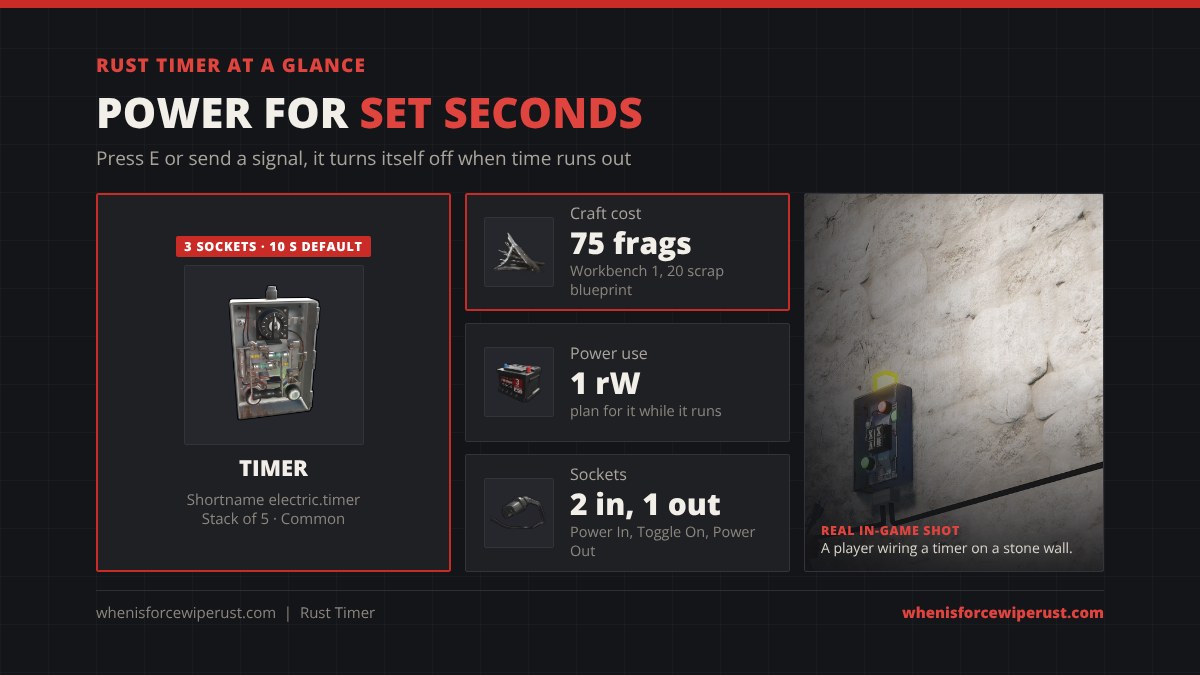
The Timer is a switch that turns itself off. Start it and it passes power for exactly as many seconds as you set, then cuts the power on its own. It costs 75 metal fragments at a Workbench 1, and it is the part behind auto-closing doors, furnace rooms that light themselves and lights that switch off when you leave.
This timer Rust guide starts with a timer calculator that turns minutes and hours into the seconds the game asks for, then covers the craft and research cost, the three sockets, how to set the time, how to wire it and the best timer setups for your base.
The timer is waiting. Press start, or send a signal into Toggle On.
electric.timer, ID 665332906) costs 75 Metal Fragments at a Workbench Level 1 and researches for 20 scrap, or unlocks on the Engineering Workbench tree. It has Power In, Toggle On and Power Out. Press E or send a signal into Toggle On and it passes power for the set time, then turns off. The default is 10 seconds; hold E while it is powered and pick Set Time to change it, always in seconds. Plan for 1 rW of its own use. It stacks to 5 and recycles into 45 frags (30 in a safe zone).
- Calculator
- What It Does
- Craft & Research
- Inputs & Outputs
- How to Set the Time
- How to Wire It
- Best Setups
- Timer vs Others
- Where to Find It
- Tips
- FAQ
What Does the Timer Do in Rust?
The game describes it as “a Timer switch, will pass power through for duration.” Think of it as a Switch with a built-in countdown. When it starts, power flows from Power In to Power Out. When the countdown hits zero, the power stops and the timer waits for the next start.
There are two ways to start it: look at it and press E, or send any power into its Toggle On input from a button, RF Receiver, pressure pad or sensor. That second input is what makes the timer useful, because it turns a short pulse into power that lasts as long as you want.
Facepunch added it in the Electric Anniversary update in December 2018, where the patch notes described it as a part that “allows passthrough while timer is active, can be customized with any duration and force toggled on via its second input.” It mounts on walls like the rest of Rust electricity.
Timer Craft Cost and Research
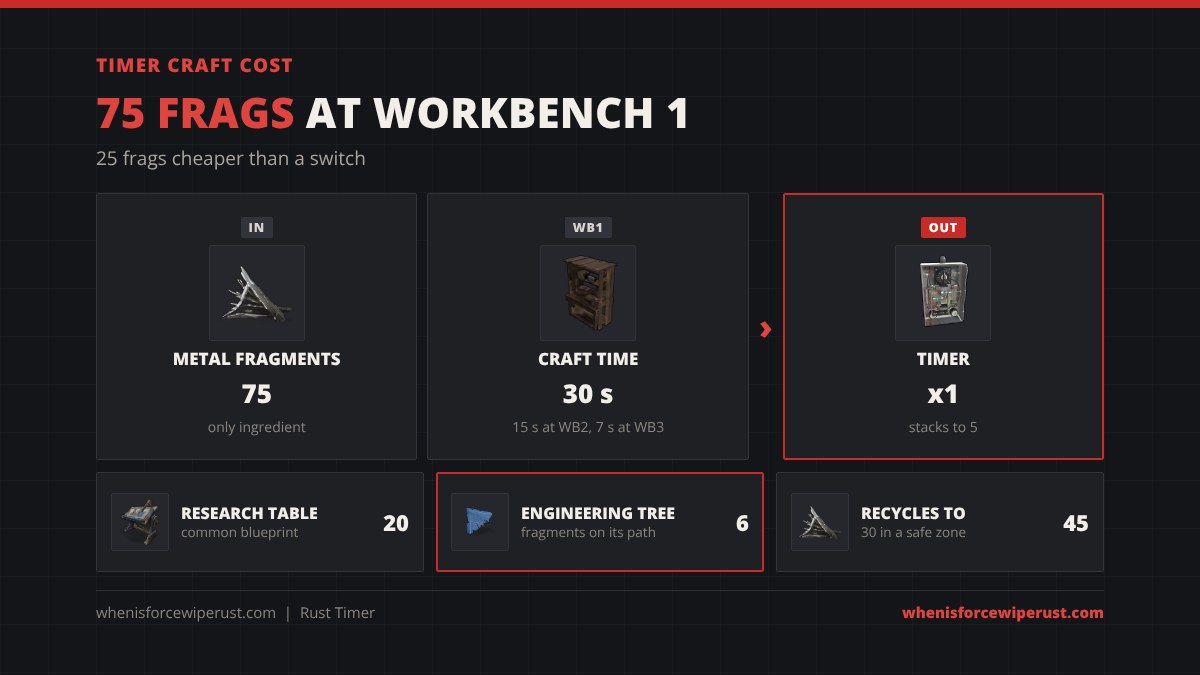
| Stat | Timer |
|---|---|
| Craft cost | 75 Metal Fragments |
| Workbench | Workbench Level 1 |
| Craft time | 30 s at Workbench 1, 15 s at Workbench 2, 7 s at Workbench 3 |
| Research cost | 20 scrap at a Research Table (common) |
| Tech tree | Engineering Workbench tree, 6 Blueprint Fragments along its path |
| Power use | Plan 1 rW while it passes power |
| Sockets | Power In and Toggle On in; Power Out out |
| Default time | 10 seconds |
| Stack size | 5 |
| Despawn | 5 minutes |
| Recycle | 45 Metal Fragments (30 in a safe zone, about 37 at an unpowered monument recycler, about 56 at the Power Plant) |
| Repair | 15 Metal Fragments at a repair bench |
| Shortname / ID | electric.timer / 665332906 |
The Facepunch wiki still lists 15 scrap to research; the current game data says 20, the same as every common item since the November 2026 update. The Button and Blocker cost the same 75 frags; the Switch is 100. Price a full wiring kit in our crafting calculator.
Timer Inputs and Outputs

| Socket | Type | What it does |
|---|---|---|
| Power In | Power | Receives the power the timer will pass on. |
| Toggle On | Control | Any power arriving here starts the timer. |
| Power Out | Power | Sends the power on while the countdown runs. |
Toggle On only needs a short pulse. A button, a pressure pad or an RF Receiver blip is enough to run the full countdown, so the timer works as a “pulse stretcher”: one quick signal in, a set amount of power out. Power In and Toggle On are separate, so the trigger can come from a different place than the power.
How to Set the Time on a Timer in Rust

- Power the timer first. Wire a source into Power In. The Set Time option only shows on a powered timer.
- Look at the timer and hold E.
- Pick Set Time and type the duration in seconds.
- Press E once to test it. Power Out stays live for that many seconds, then turns off.
Rustafied’s testing found you can enter anything from 1 to 1,000,000,000 seconds. Because the box only takes seconds, use the calculator above or this table:
| You want | Type this | Good for |
|---|---|---|
| 3 seconds | 3 | Auto-closing door, airlock |
| 5 seconds | 5 | Igniter burst for a furnace room |
| 30 seconds | 30 | Sprinkler watering burst |
| 1 minute | 60 | Hallway lights after a pressure pad |
| 10 minutes | 600 | Room lights |
| 1 hour | 3600 | Heater for a farm |
| 8 hours | 28800 | Offline turret arm (battery permitting) |
How to Wire a Timer in Rust
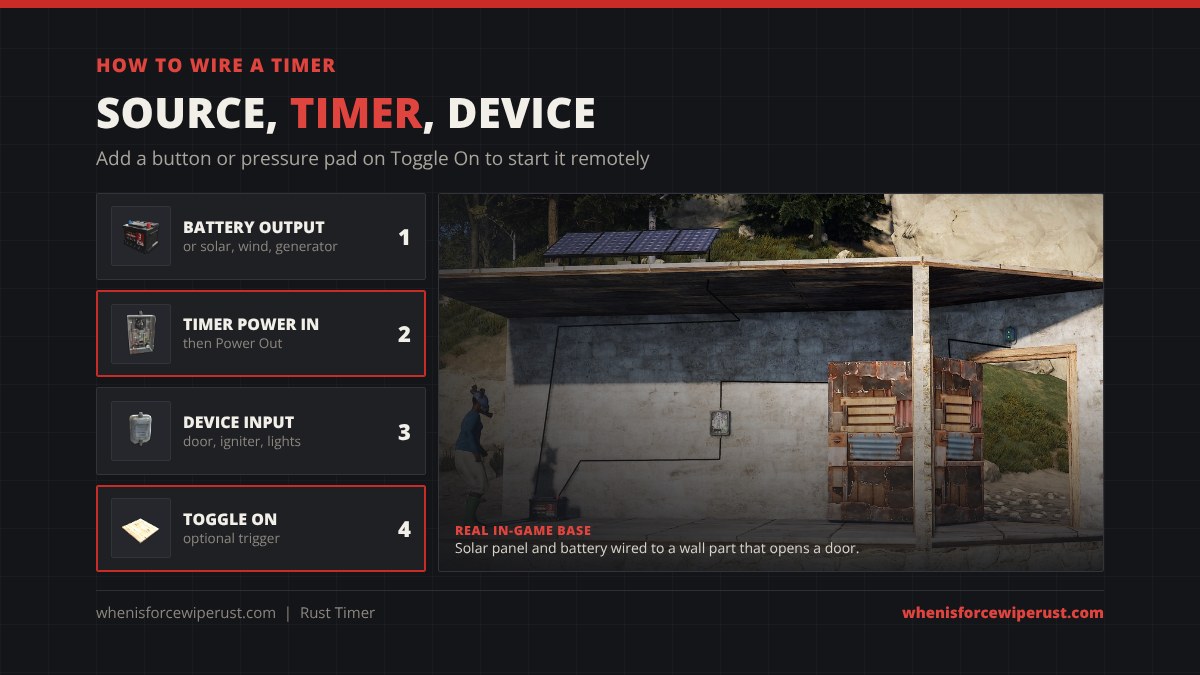
- Craft a Wire Tool and place your power source: a solar panel, battery or generator.
- Place the timer on a wall, ideally where you can reach it from inside.
- Wire the source output into Power In.
- Wire Power Out into the device, such as a Door Controller, Igniter or ceiling light. For several devices, go into a Splitter or Electrical Branch after the timer.
- Optional: wire a button, pressure pad or sensor into Toggle On so it starts on its own.
- Hold E, Set Time, then press E to test.
If the device does not turn on, the usual cause is too little power once the timer keeps its share. Feed the timer the device’s need plus 1 rW, and add a battery if a solar panel is the only source at night. Size it with our battery calculator.
Best Timer Setups for Your Base

- Auto-closing door. Battery, timer, Door Controller. Set it to 3 to 5 seconds. Press E on the timer from inside, walk out and the door shuts behind you, even if a door camper kills you on the step.
- Furnace room. Timer in front of an Igniter, set to about 5 seconds. One press lights every furnace in range, then the igniter turns off before it wears itself down.
- Lights that switch themselves off. A pressure pad or HBHF Sensor into Toggle On, and ceiling lights on Power Out at 60 to 600 seconds. Walk in and the lights stay on long enough to loot, then go dark.
- Watering bursts. Timer output into a Fluid Switch or sprinkler line at about 30 seconds, so your farm gets water without being soaked.
- Trap base. A hidden pressure pad into Toggle On, and a Door Controller on Power Out: whoever steps on it opens the trap door for as long as you set.
A timer only runs once per start. If you want something to happen at a set time of day, use a Digital Clock instead; if you want it to repeat by itself, you need a clock or a loop of logic parts, which our logic gates guide covers.
Timer vs Switch, Button, Blocker and Digital Clock

| Part | Cost | How it turns on | When it turns off |
|---|---|---|---|
| Timer | 75 frags, WB1 | Press E or a signal on Toggle On | By itself, after the set seconds |
| Switch | 100 frags, WB1 | Press E or a signal on Switch On | When flipped off |
| Button | 75 frags, WB1 | Press E | After its short press time |
| Blocker | 75 frags, WB1 | Passes power by default | While a signal blocks it |
| Digital Clock | 100 frags, WB2 | At the in-game times you set | After its alarm output |
Use a Switch for anything that should stay on. Use a Timer whenever something should turn itself off, or when a short pulse from a sensor or button has to keep a device running. The Digital Clock is the one to use for real schedules, like lights at night.
Where to Find a Timer
Most players craft it as soon as they have a Workbench 1. It also drops as loot (Facepunch wiki rates):
| Source | Amount | Chance |
|---|---|---|
| Brown crates (including wagon and Underwater Lab) | 1 | 1.3% |
| Underwater Lab advanced crate | 1 | 1.1% |
| Scientists, Tunnel Dwellers and Underwater Lab Dwellers | 1 | 0.2% |
| Scarecrows and gingerbread (Halloween and Christmas events) | 1 | 0.2% |
Spare timers recycle into 45 metal fragments in a normal recycler, or 30 in a safe zone.
Timer Tips

- Power it before you set it. Set Time only appears on a powered timer.
- Seconds only. 600 is ten minutes, 3600 is an hour. The calculator does the math.
- Budget 1 rW. A door controller behind a timer wants 2 coming in, a turret 11.
- Short igniter bursts. Igniters take damage while powered, so 3 to 5 seconds is plenty.
- Use Toggle On. A 75 frag timer turns a one-tick pressure pad into a full minute of light.
- Repair, do not replace. A damaged timer costs 15 frags at a repair bench.
Rust Timer FAQ
How much does a timer cost in Rust?
The Timer costs 75 Metal Fragments at a Workbench Level 1. It takes 30 seconds at a Workbench 1, 15 at a Workbench 2 and 7 at a Workbench 3. Researching it costs 20 scrap at a Research Table.
How do you set a timer in Rust?
Wire power into the timer’s Power In, look at it, hold E and choose Set Time. Type the duration in seconds, for example 60 for one minute or 3600 for one hour, then press E to start it.
What is the default time on a Rust timer?
A new timer is set to 10 seconds. Change it with Set Time while the timer is powered.
What is the maximum time on a timer in Rust?
Rustafied’s testing found the Set Time box accepts 1 to 1,000,000,000 seconds, so in practice there is no useful limit. Your battery runs out long before the timer does.
What does Toggle On do on a timer?
Toggle On is the timer’s trigger input. Any power arriving there starts the countdown, so a button, pressure pad, sensor or RF Receiver can start the timer without anyone pressing E on it.
How do you wire a timer in Rust?
Run a power source into the timer’s Power In, then run Power Out into the device, such as a door controller or igniter. Optionally wire a button or sensor into Toggle On so it starts by itself.
How much power does a timer use in Rust?
Plan for 1 rW, like a switch. Feed the timer the device’s power need plus 1 so the device still runs when the timer passes power on.
What is the difference between a timer and a switch in Rust?
A switch stays on until you flip it off. A timer turns itself off after the time you set. The timer is also 25 metal fragments cheaper: 75 against the switch’s 100.
What does a timer recycle into?
45 Metal Fragments in a normal recycler and 30 in a safe zone recycler.
- Sources: Rust game item data (Nov 2026), Facepunch Rust wiki (electric.timer), Facepunch Electric Anniversary devblog, Corrosion Hour item database, Rustafied electricity guide screenshots and testing.