Your base is getting hit at 4 a.m. and you are asleep. Rust+ is the reason some players wake up and log in while others wake up to an empty base. It is Facepunch’s free companion app, and it puts your server map, your team chat, your tool cupboard and your raid alarms on your phone.
This Rust+ app guide covers what the app does, where to download it, how to pair a server and your smart devices, how to build a raid alarm that actually fires, how cameras work in the app, and how to fix it when pairing does nothing. Every store number below was checked on November 4, 2026.
What Is the Rust+ App?
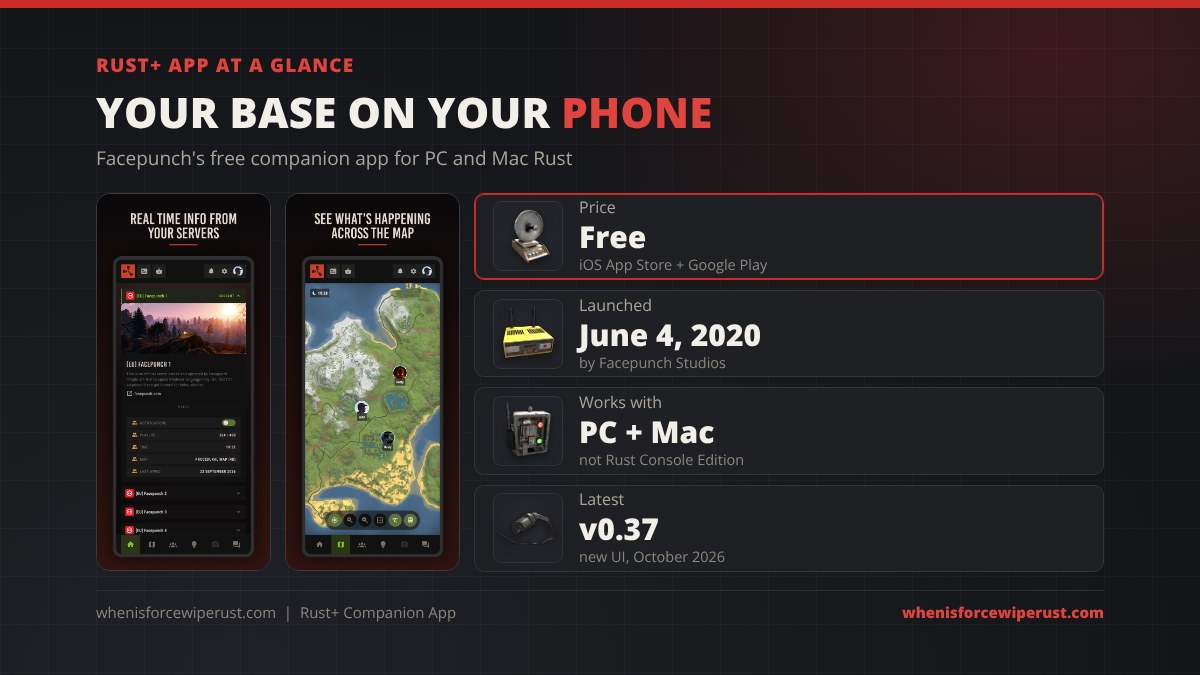
Rust+ (Rust Plus) is the official Rust companion app made by Facepunch Studios. Facepunch launched it on June 4, 2020 for the App Store and Google Play. Its own store listing sums it up: coordinate with your team, receive alerts when you are being raided, remotely set off traps, and more.
It is not a way to play Rust on your phone. You cannot move, shoot or loot from it. If you are looking for the real game on a phone, that is the separate Rust Mobile project, covered in our Rust Mobile guide. Rust+ also only works with Rust on PC and Mac; the store listing says Rust Console Edition is not supported, which our console edition guide covers too.
Here is everything the app does once a server is paired:
| Feature | What you get | Needs a device? |
|---|---|---|
| Server hub | Player count, current game time, map name and size, last wipe date, online teammates | No |
| Live map | Full server map with monuments, teammates, vending machines and events like the attack helicopter and Cargo Ship | No |
| Team chat | Send and read team chat; it syncs with the in-game team chat both ways | No |
| Clan tab | Clan members, roles and the clan announcement | No (needs a clan) |
| Notifications | Teammate came online, you were killed while offline, Rust news (each one can be turned off) | No |
| Raid alerts | Custom push notification when a Smart Alarm gets power | Smart Alarm |
| Remote control | Turn lights, turrets, SAM sites, pumps or traps on and off | Smart Switch |
| Base info | TC upkeep time left and the contents of a TC or Large Wood Box | Storage Monitor |
| Cameras | View CCTV and PTZ cameras on the server (alpha feature) | Camera |
| News | Facepunch devblogs and update posts | No |
Rust+ Download: iOS and Android
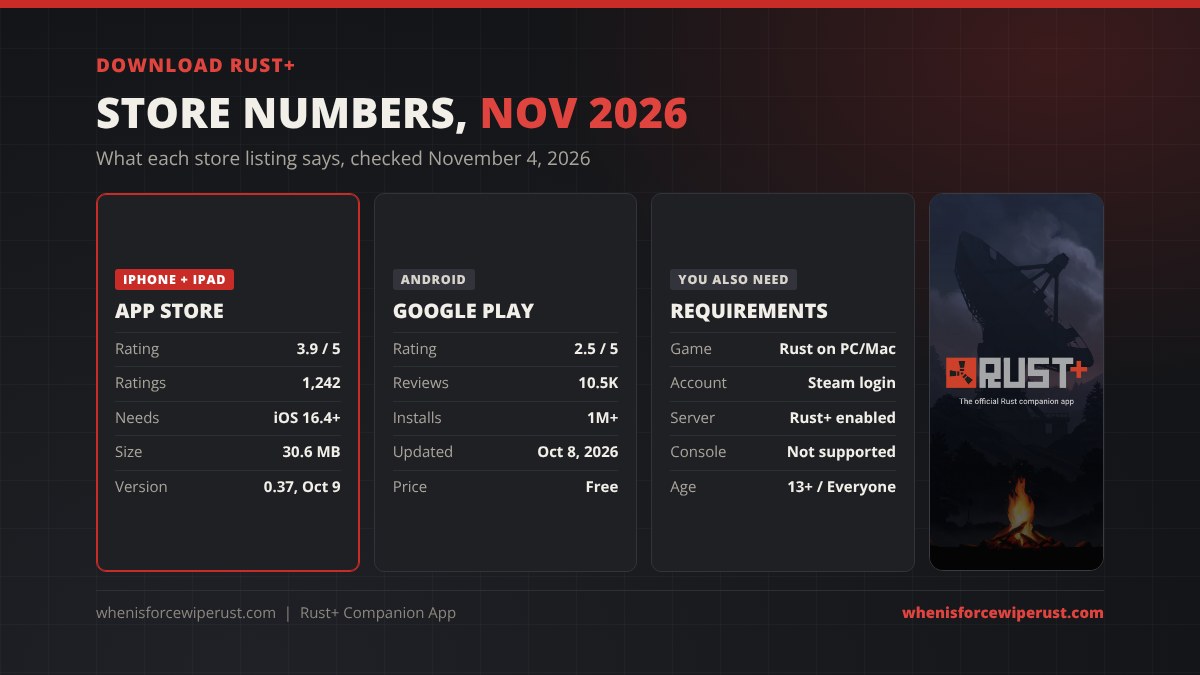
Rust+ is free on both stores, with no in-app purchases listed. Search for Rust+ by Facepunch Studios, or use the official links: Rust+ on the App Store and Rust+ on Google Play. Watch out for look-alike apps with “Rust” in the name; the real one is published by Facepunch.
We pulled the numbers from both listings on November 4, 2026:
| Store | Rating | Volume | Requirements | Last update |
|---|---|---|---|---|
| App Store (iPhone, iPad) | 3.9 / 5 | 1,242 ratings | iOS 16.4 or later, 30.6 MB, age 13+ | Version 0.37, October 9, 2026 (“New UI designs”) |
| Google Play (Android) | 2.5 / 5 | 10.5K reviews, 1M+ installs | Rated Everyone | October 8, 2026 |
The gap in ratings is mostly pairing trouble: when the pair notification never arrives, people blame the app. The fixes section below covers the usual causes. To use the app you also need Rust on PC or Mac (see our Mac and Steam Deck guide), a Steam account to sign in with, and a server that has Rust+ turned on.
How to Pair Rust+ With a Server
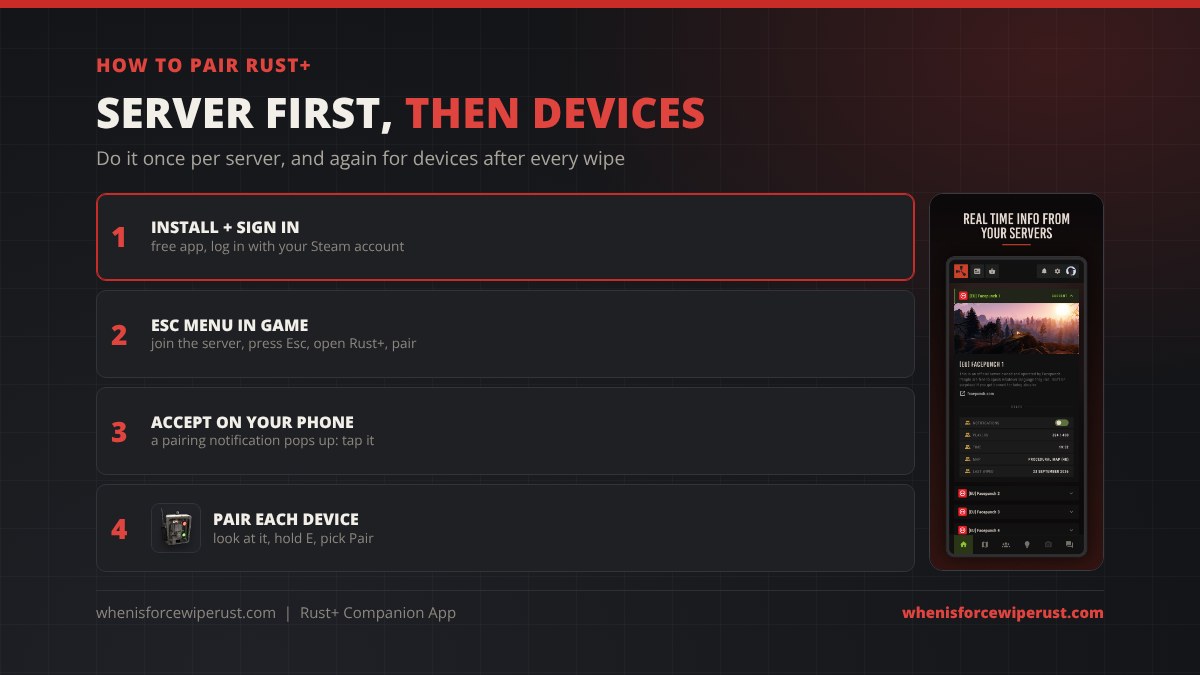
Pairing is a two-step job: first the server, then each smart device. It only takes a minute.
- Install and sign in. Open Rust+ on your phone, sign in with the same Steam account you play on, and allow notifications. Pairing requests arrive as notifications, so this matters.
- Open Rust+ in game. Join the server on your PC, press Esc, open the Rust+ option and pair with the server.
- Accept on your phone. A pairing notification pops up. Tap it and the server shows up in your hub with its player count, time and map.
- Pair your devices. Walk up to a powered Smart Alarm, Smart Switch or Storage Monitor, look at it, hold E and pick Pair. Accept the notification and it appears under Devices.
The Rust+ Map
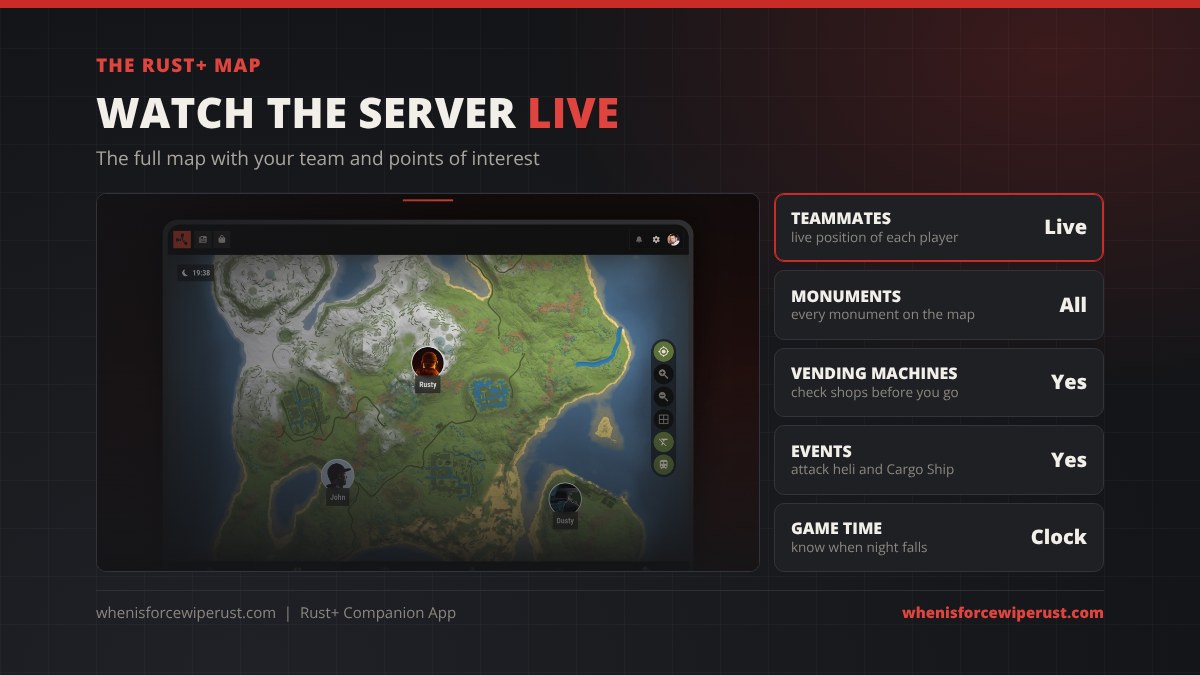
The map is the feature most players open first. It shows the whole server map with every monument, where each teammate is right now, and points of interest. Facepunch built it to track events too, such as the attack helicopter and the Cargo Ship.
The most useful trick is shopping before you leave base. Vending machines show on the map, so you can check who is selling what without running across the island. The clock in the corner also tells you when night is coming, which helps you time a roam or a farm run.
Many players keep the Rust+ map open on a phone stand or a second screen while they play, so they never have to open the in-game map mid-fight. If you go the second-screen route, a monitor arm keeps it out of the way.
Team Chat, Clans and Notifications
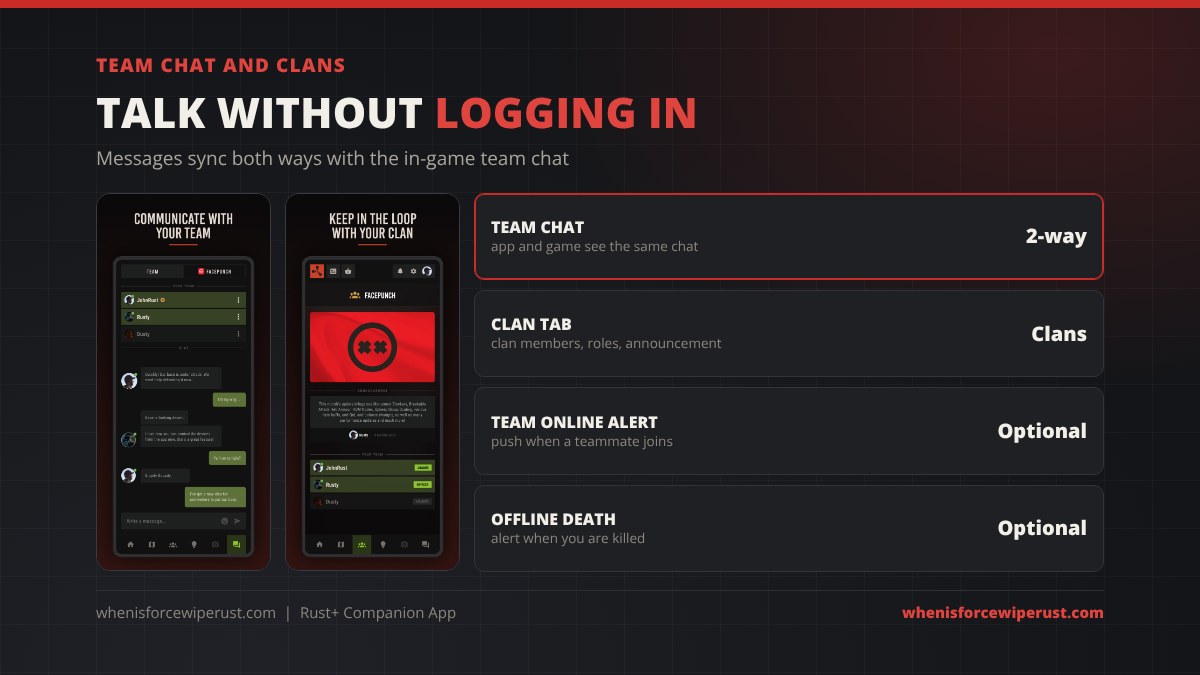
Messages you send in Rust+ show up in the in-game team chat, and team chat from the game shows up in the app. Global server chat does not. That makes it easy to warn your group that the base is being hit, or to plan the night’s raid from work. Our Rust clans and teams guide explains how teams and clans work in game; the app now has a clan tab with members, roles and the clan announcement.
There are three notification types, and each can be switched off in the app’s settings:
- Teammate online: a push when someone on your team joins the server.
- Death while offline: a push when your sleeper is killed, which is often the first sign of a raid.
- News: new Facepunch devblogs, like the monthly Rust updates.
One small catch: Facepunch said at launch that emoji codes are not supported in the app’s chat, so they can show as plain text there.
Rust+ Smart Devices
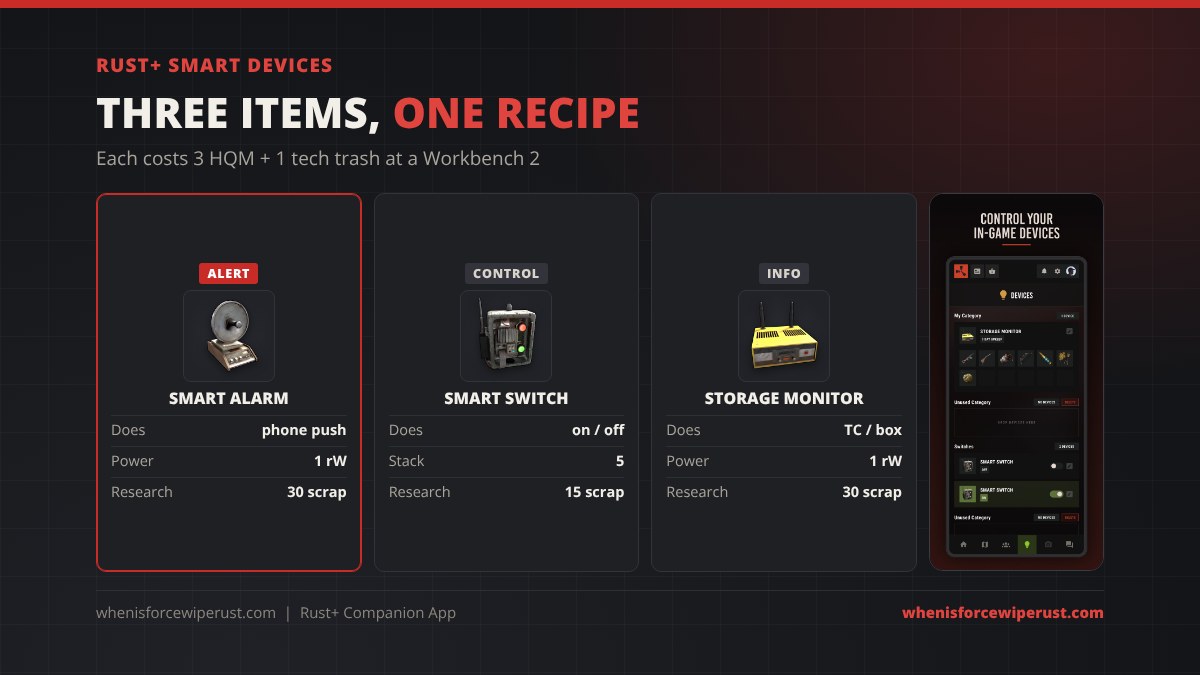
The app gets powerful once you connect in-game electrical items. All three share the same recipe: 3 high quality metal and 1 tech trash at a Workbench Level 2, 25 seconds each in the game file.
| Device | Shortname / ID | What it does in Rust+ | Research | Stack |
|---|---|---|---|---|
| Smart Alarm | smart.alarm / -695978112 | “Sends notifications to your phone when powered on.” Custom alert text. | 40 scrap | 5 |
| Smart Switch | smart.switch / 988652725 | Turns whatever is behind it on or off from the app | 15 scrap | 5 |
| Storage Monitor | storage.monitor / 1149964039 | Shows TC upkeep time and the items in a TC or Large Wood Box | 30 scrap | 1 |
Two rules from Facepunch matter here. A Smart Switch can be flipped by hand in game only by players with building privilege, and a Smart Alarm only notifies paired players who still have building privilege. If you get kicked off the TC, the alerts stop.
Good Smart Switch jobs: arm your auto turrets before you log off, switch off your SAM site before you fly home, fire a tesla coil trap, or run your water pumps. For more circuits, see our Rust electricity guide.
Admins on their own server can spawn the devices with these commands:
inventory.give smart.alarm 1
inventory.give smart.switch 1
How to Set Up a Rust+ Raid Alarm
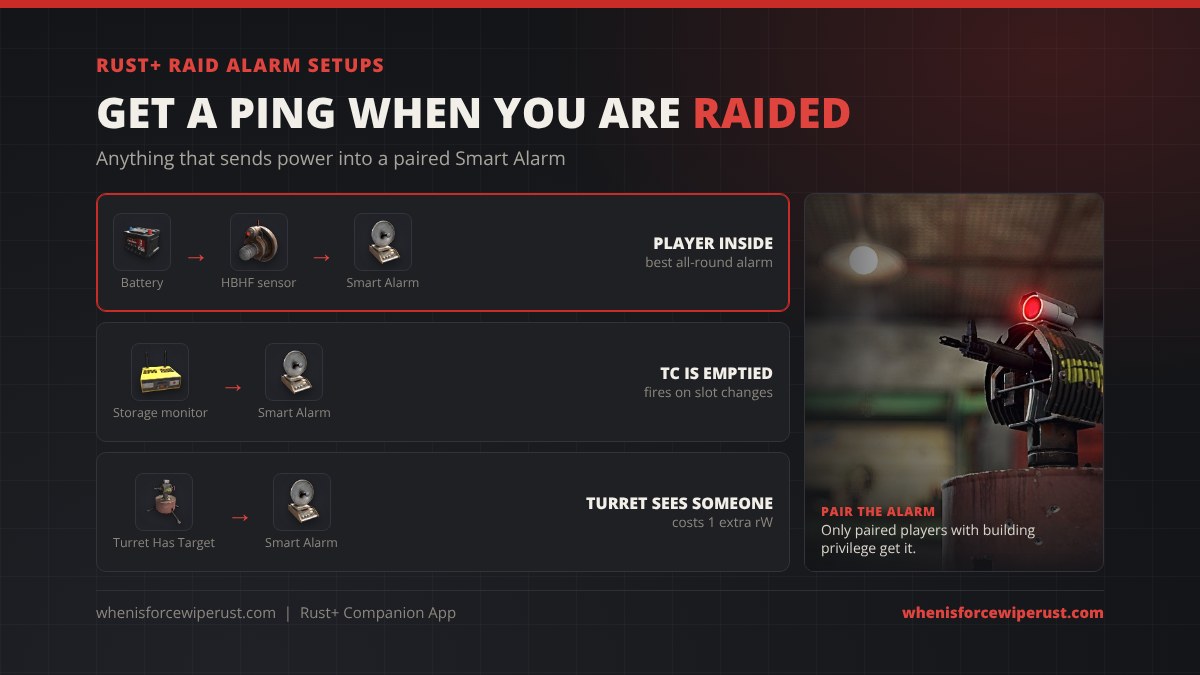
A Smart Alarm sends a push the moment it receives power. So a raid alarm is just “something that only sends power when a raider is there” wired into a paired Smart Alarm. These are the three setups that work best:
| Setup | Wiring | Fires when | Power |
|---|---|---|---|
| Motion alarm (best all-round) | Battery → HBHF Sensor → Smart Alarm | An awake player is inside the sensor range | About 2 rW (1 sensor + 1 alarm) |
| TC alarm | Power → Storage Monitor on the TC, output → Smart Alarm | A slot in the TC goes from full to empty or empty to full | About 2 rW |
| Turret alarm | Auto Turret “Has Target” output → Smart Alarm | The turret locks on to someone | Turret uses 1 extra rW for the output |
- Pick a spot only a raider reaches. Put the HBHF sensor inside the loot room or the TC room, not by the front door you walk through daily. The sensor can be set to ignore players authorized on your TC, so it stays quiet when you are home.
- Use a battery. Solar dies at night and a cut wire kills the alarm. A small battery on a solar panel or windmill keeps it running 24/7.
- Wire and pair. Run the wire into the Smart Alarm, then look at the alarm, hold E and pick Pair. Accept it on your phone.
- Name the alert. Give it clear text such as “LOOT ROOM” so you know which alarm went off.
- Test it. Have a teammate walk in while the sensor is set to include authorized players. If no push arrives, check the fixes below.
Rust+ Cameras
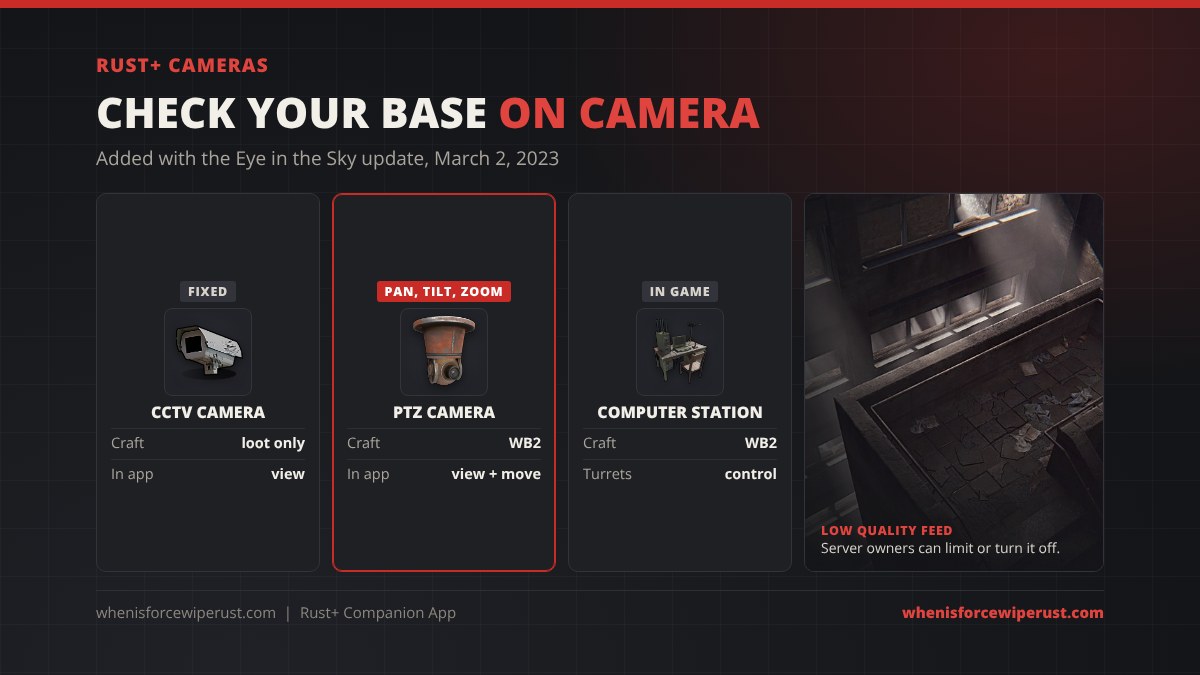
Camera viewing came to Rust+ with the Eye in the Sky update on March 2, 2023, the same update that added the PTZ camera and turret control from the Computer Station. Facepunch said all the new controllable cameras can be used from Rust+ as well.
- It is still labelled alpha. Facepunch warned it may be disabled or limited to keep servers stable, and server owners control it with the camerarenderer settings.
- The feed is low quality. Good enough to see who is in your base, not to read a code lock.
- PTZ cameras pan, tilt and zoom and mount on a ceiling. They craft at a Workbench 2 from a CCTV camera and 150 metal fragments.
- Monument cameras use the codes in our CCTV codes list.
You can watch from the app, but you cannot shoot turrets from your phone; turret control is done in game at a Computer Station.
Rust+ Not Working? Fixes
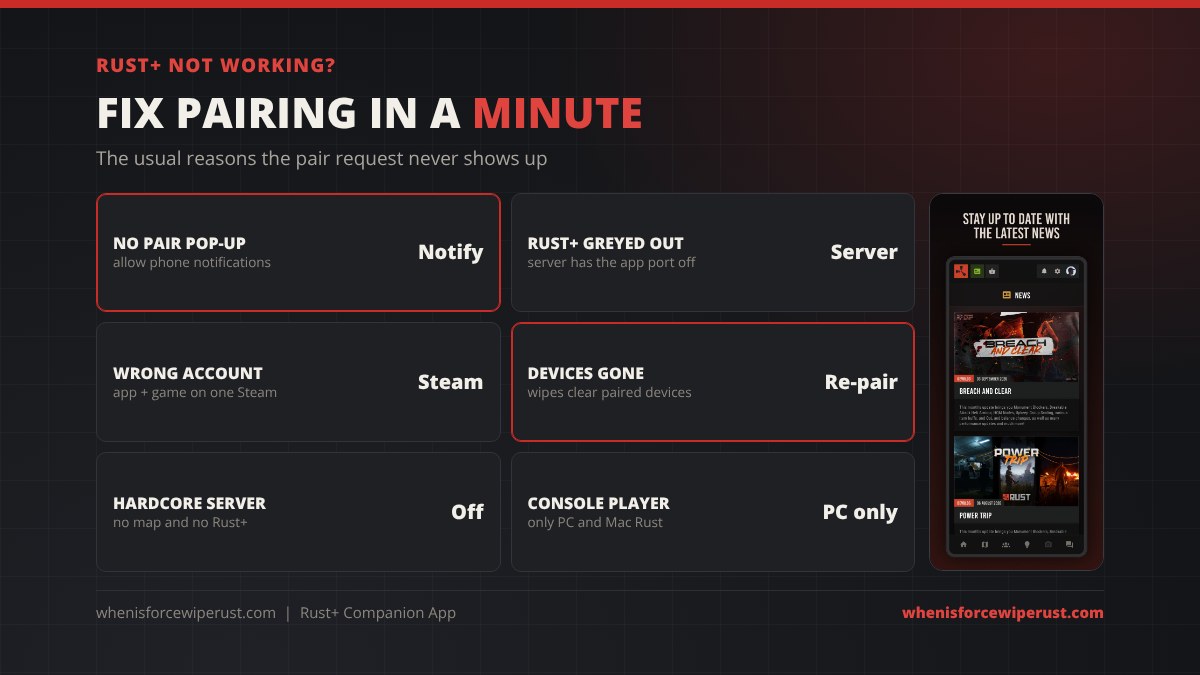
| Problem | Likely cause | Fix |
|---|---|---|
| Pair request never arrives | Phone notifications are off for Rust+ | Allow notifications, reopen the app, pair again from the Esc menu |
| Rust+ option missing or greyed out | The server has Rust+ turned off or its app port is blocked | Play on a server that supports it, or fix the port if it is your server |
| Paired, but nothing shows | App and game signed in to different Steam accounts | Sign out of the app and back in with your game account |
| Devices vanished | Map wipe cleared them | Re-pair the server and each device on the new map |
| Smart Alarm silent | No power, not paired by you, or you lost building privilege | Add a battery, pair it on your phone, re-auth on the TC |
| No Rust+ at all | Hardcore mode server or Rust Console Edition | Hardcore removes the map and Rust+; console is not supported |
Running your own server? Rust+ uses the app.port setting (TCP, 28082 by default), and that port must not be firewalled. Our guide to hosting a Rust server has the full port list. Hardcore rules are in our softcore vs hardcore guide.
Rust+ Tips
- Watch your upkeep. A Storage Monitor on the TC shows exactly how long your base is protected. Plan top-ups with our upkeep calculator so decay never takes your base.
- Every teammate pairs. Alerts go to whoever paired the alarm. Make the whole group pair it, so someone always wakes up.
- Use categories. The Devices tab lets you group switches and alarms, which helps once you have a dozen of them.
- Turn turrets on from the car park. A Smart Switch on your turret line means you can arm them on your way out, and shut them off before you walk in.
- Pick a server you can actually play. Use our Rust servers list and the server wipe schedules so you are not re-pairing every three days.
Rust+ App FAQ
What is the Rust+ app?
Rust+ is the official, free Rust companion app from Facepunch Studios for iOS and Android. It shows the server map and your team, syncs team chat, and connects to Smart Alarms, Smart Switches and Storage Monitors in your base. You cannot play the game in it.
Is Rust+ free?
Yes. Rust+ is free on the App Store and Google Play. You only need a copy of Rust on PC or Mac and a Steam account to sign in.
How do you pair Rust+ with a server?
Sign in to the app with your Steam account and allow notifications. Join the server on PC, press Esc, open Rust+ and pair, then accept the notification on your phone.
How do you pair a smart alarm with Rust+?
Pair the server first. Then power the Smart Alarm, look at it, hold E and pick Pair, and accept the notification on your phone. Every teammate who wants the alert has to pair it too.
How do you set up a raid alarm in Rust?
Wire a battery into an HBHF sensor, the sensor into a Smart Alarm, and pair the alarm with Rust+. The alarm sends a push whenever the sensor sees a player. A Storage Monitor on your TC or an auto turret’s Has Target output can feed the alarm instead.
Does Rust+ work on console?
No. Facepunch’s store listing says Rust+ requires Rust on PC or Mac and that Rust Console Edition is not supported.
Can you play Rust on Rust+?
No. Rust+ is a companion app. It shows information and controls paired devices, but you cannot move or fight in it. Rust Mobile is a separate game.
Can you see cameras in Rust+?
Yes. Since the Eye in the Sky update on March 2, 2023 you can view CCTV and PTZ cameras from the app. It is an alpha feature with a low quality feed, and server owners can limit it.
Why is Rust+ not working?
The usual causes are notifications turned off on your phone, a server with Rust+ disabled, a different Steam account in the app and game, or devices cleared by a wipe. Hardcore servers do not support Rust+.
Do you need to re-pair Rust+ after a wipe?
Yes for devices. A map wipe removes your Smart Alarms, Switches and Monitors, so you place and pair new ones on the fresh map.
Sources
- Facepunch: Rust+ companion app launch (June 4, 2020)
- Facepunch: Eye in the Sky update (March 2, 2023)
- Rust+ on the App Store
- Rust+ on Google Play
- Facepunch Rust Wiki: Smart Alarm
- Recipes, research costs and IDs: Rust game item files (items.craft.json), October 2026